2 Simulation Examples in a Spreadsheet
This chapter uses spreadsheet examples to provide an introduction to simulation. The examples are relatively simple; many can be carried out manually as well as in a spreadsheet. Our main purpose is to introduce and illustrate some of the key concepts in simulation; it is not to teach how to formulate or develop a spreadsheet model, but rather to use a few simple spreadsheet models to illustrate, by example, some of the key elements of any simulation. These key elements range from the components of a model to experimentation with the model.
Although some types of real-world simulation models, such as those for risk analysis, financial analysis, some reliability problems and others, are amenable to a spreadsheet formulation and solution, the spreadsheet has severe limitations for most complex real-world dynamic, event-based simulations. More often, these complex models are developed in a simulation package or general purpose programming language, not in a spreadsheet.
The spreadsheet examples include both Monte Carlo simulations and dynamic simulations that track events over time. Spreadsheet simulations are carried out by devising a simulation table tha provides a method for tracking system state over time. Although the simulation tables contain a number of common elements, in general they are ad hoc, meaning they are custom designed for the problem at hand. Due to its ad hoc nature, a general framework for carrying out dynamic discrete-even simulations is needed.
The key elements introduced in this chapter include the use of random numbers to represen uncertainty, the descriptive statistics used for predicting system performance in queueing and inventory models, and the advantage of thinking of a model in terms of inputs, activities, events, states, outputs and responses. These topics are introduced here via example.
Section 1 covers the basics, such as generating random samples and the basic components of a simulation model; subsequent examples depend on the concepts and techniques learned here. The examples in the remaining sections cover application areas such as coin tossing, queueing or waiting lines, inventory policies, reliability, hitting a target (bombing or a dart board), and projec network analysis. In the examples, we put limited focus on model implementation; instead, we focus on identifying model components (inputs, events, states, and so on) and conducting a simple experiment, the key concept being trials or replications.
All of the examples in this chapter have a spreadsheet solution in Excel on the text’s web site, www.bcnn.net. The spreadsheets include notes and comments, which add technical detail to each example, including implementation details, which may prove of value to a student modifying an existing model or developing a new spreadsheet simulation model, as requested in some of the exercises.
1 The Basics of Spreadsheet Simulation
In this section we cover the basic material that allows us to carry out the example simulations in the remainder of the chapter. We will learn how to generate random numbers in a spreadsheet simulation, and where to obtain them for a manual simulation. We will learn how to generate random samples for a few simple situations, such as tossing a coin, service and arrival times for queueing simulations, and random demand for inventory models. The methods learned here are sufficient for any of the simple discrete statistical distributions used in the examples in this chapter.
1.1 How to Simulate Randomness
Almost all of the simulation models considered in this text contain one or more random variables. Clearly with coin tossing, some mechanism is needed to simulate a random toss that will result in a head or a tail. In queueing models, both service times and interarrival times may be defined by a statistical distribution when the arrival times and service times are not known in advance and canno be predicted but follow a statistical pattern.
How do we get random quantities? We leave alone the theory and general explanations behind the generation of random numbers and random variables. In this chapter, we take a pragmatic, practica point of view: How do we get random quantities for a spreadsheet or manual simulation?
Generating any random quantity begins with generating a random number in the interval from 0 to 1. The term “random number” always refers to a randomly generated quantity in the unit interval between 0 and 1. In contrast, the term “random variable” refers to any randomly generated quantity with a specified statistical distribution. Any method for generating a sequence of random numbers is called a Random Number Generator (RNG).
The generation method for random numbers should produce a sequence of numbers that have two important statistical properties:
The numbers should be uniformly distributed between 0 and 1.
Subsequent numbers generated should be statistically independent of all previous numbers generated.
Uniformity implies, among other things, that the probability of falling in an interval (a, b) (with a and b between 0 and 1) equals the length of the interval, b a. Statistical independence implies, among other things, that knowing the value ofpreviously generated numbers does not help in any way in predicting the value of numbers generated subsequently. In addition, it implies that the correlation between successive numbers is zero.
The resulting numbers are often called pseudo-random numbers. One reason is the paradox that, while we want the generated numbers to be statistically uniform and independent, we also wan control. We want to be able to reproduce the sequence at any time so that simulation experiments can be controlled and reproduced, and for another practical reason: to assist in model developmen and debugging.
In general, how do we get these random numbers? Where do they come from? (In what follows, VBA stands for Visual Basic for Applications, the implementation of the VB programming language in Excel and other Microsoft Office applications.) Here are a number of standard sources for random numbers:
- In Excel, we can use the built-in worksheet function RAND in a formula in a cell. RAND generates values between 0 and 1. Typical examples of formulas using RAND include generating a random value between 0 and 1, as follows:
or in a more complex expression such as the following for generating one of two values, 0 or 1:
Note that the IF worksheet function checks a condition in its first argument, and if the condition is true returns the first value; otherwise it returns the second value.
Excel also provides the worksheet function, RANDBETWEEN(), that returns uniformly distributed integer values between a specified low and high value. Excel, or some of its add-ins, provide other functions to generate random values. We use none of these.
In a worksheet cell in Excel, we can call a user-written VBA function that, in turn, calls an internal VBA library function such as Rnd() or the VBA function (MRG32k3a) available on the text’s web site. The spreadsheet examples in this chapter all have the VBA function Rnd01() that can be called from a cell. (Rnd01() simply calls the internal VBA library function Rnd().)
Simulation packages provide methods to generate both random numbers and random variables from a long list of standard statistical distributions as well as from data.
Most general-purpose programming languages provide a built-in library function to generate random numbers, and many provide facilities to generate samples from a variety of statistical distributions. Lacking this, the model developer can program one or more algorithms.
For manual (paper-and-pencil) simulations, you could use a physical RNG such as tossing one or more coins, or throwing dice. These being impractical for all but the simplest cases, another possibility is a table of random numbers or random variables from a specific distribution, such as Tables A.1 (for uniform) and A.2 (for the standard normal) in the Appendix.
Neither the worksheet function RAND() nor the VB function Rnd() should be used in professional work; they both have known deficiencies. For example, the VB function Rnd() returns a single precision value (about 5 decimal place of accuracy), while all good RNG return double precision (about 15 decimal places); secondly, Rnd() has a short period—it repeats after generating a relatively small number of values. Its period is 2^24, about 16.77 million. The RAND() function has an even shorter period and more serious deficiencies regarding the two key properties of uniformity and independence. (Note that Microsoft changed the RAND() function in Office 2003; reportedly, i has both bugs and deficiencies and has been widely criticized.) We use RAND() only in Example 1, merely for instructional purposes. Since much better generators are readily available, including the VBA function MRG32k3a, on the text’s web site in the Excel file “RandomNumberTools.xls”, we feel strongly that there is no reason (or excuse) to use a deficient generator for professional work.
Most RNG can be initialized by a user-specified number called a seed. The VBA code behind the ‘Reset Seed & Run’ button in the spreadsheet examples shows how to set the seed for VBA’s Rnd() generator. Apparently, there is no way to set the seed for Excel’s RAND generator (another reason not to use it). The MRG32k3a generator (in “RandomNumberTools.xls”) comes with the VBA function, InitializeRNSeed(), for setting that generator’s seed. By specifying the seed, the user can make a random number generator repeat a sequence of numbers. This is valuable for debugging simulation models and repeating simulation experiments. Remember that we are simulating randomness; the control given by repeatability is a feature, not a bug.
1.2 The Random Generators Used in the Examples
Each example spreadsheet has a number of VBA functions for generating random variables in a few simple cases. We advise starting with an existing spreadsheet model when developing a new model; in this way, all the VBA functions written for the examples will be available for the new model.
The VBA functions and Excel worksheet functions for generating random values in a cell in a worksheet include the following:
Rnd01(), to generate a random number between 0 and 1;
DiscreteUniform(min, max), to generate a random integer from the minimum value, min, to the maximum value, max, where min and max can be numbers or a single-cell range containing the number;
DiscreteEmp(rCumProb, rValues), to generate samples from a discrete distribution specified by two Excel ranges (ranges of cells), rCumProb for the cumulative probabilities, and rValues for the values;
Uniform(low, high), to generate a real value (not just integers) from the continuous uniform distribution between low and high, where low and high are numbers or a cel containing a number;
NORMSINV(Rnd01()), to generate a standard normal with mean 0 and standard deviation 1.
All of these functions, except NORMSINV(), are VBA functions written for the examples in this chapter; NORMSINV() is an Excel worksheet function that can be used (in the form given above) to generate a standard normal. We recommend not using the worksheet functions RAND() and RANDBETWEEN(). All spreadsheet solutions have access to any of the functions, whether used or not in the supplied solution; therefore, the example spreadsheets are good starting points for some of the exercises.
At this early point in the text, we do not expect the reader to completely understand how all of these work. Our goal, however, is that you understand the nature of the random values generated by each function, and be able to use them in the exercises if modifying an example or creating a new spreadsheet model. Each of these functions is explained in more detail as they are used in an example in later sections.
1.3 How to Use the Spreadsheets
The spreadsheet simulation models are in the ‘One Trial’ worksheet of each solution workbook. This sheet contains the definition and specification of model inputs, the simulation table containing the formulas to generate each row to carry the simulation forward, and some summary statistics (and usually a histogram) representing the results of one simulation run. The two buttons on the worksheet control the simulation:
On each click, the ‘Generate New Trial’ button makes a new run of the simulation, using a new sequence of random numbers each time.
On each click, the ‘Reset Seed & Run’ button sets the RNG seed to the value specified by the user in an adjacent cell, and then runs the simulation using this seed. The default seed is the arbitrary value 12,345.
You can always return to the initial results by clicking the ‘Reset Seed & Run’ button.
The ‘Experiment’ worksheet allows a user to conduct a simulation experiment by repeatedly executing the ‘One Trial’ worksheet, each time with different random numbers, and recording the designated model response (from the Link cell) to the Response Table. The user specifies the number of trials, for example, 100, meaning that the ‘One Trial’ worksheet will be executed 100 times and the 100 response values recorded in the Response Table. This is called replication; the number of replications is the number of trials.
The experimental results over all trials are summarized in the “Multi-Trial Summary” table on the ‘Experiment’ sheet. These summary statistics include frequency distributions and an accompanying histogram, and standard statistics such as sample average, median, minimum, and maximum. An example is shown in Table 6 in Section 2.
To run the experiment on the ‘Experiment’ worksheet, use the two buttons as follows:
On each click, the ‘Run Experiment’ button makes one run of the experiment for the specified number of trials. Each subsequent click runs the experiment using different random numbers.
On each click, the ‘Reset Seed & Run’ button sets the RNG seed to the specified value in an adjacent cell (default 12,345) and makes one run of the experiment. Each click reproduces the exact same original results.
The results given in all the examples in this chapter come from clicking the ‘Reset Seed & Run button; this guarantees that a reader can reproduce these same results. Each spreadsheet solution contains comments and explanations on different aspects of the solution, including the implementation of model logic; some solutions have a worksheet named ‘Explain’ with lengthier explanations of certain aspects of the model.
1.4 How to Simulate a Coin Toss
How can we simulate a coin toss in a spreadsheet model? The solution shows how to use a uniform random number generator in a spreadsheet simulation.
Example 1: Coin Tossing
We want to simulate a sequence of 10 coin tosses. The coin is a “fair” coin, meaning that the chance of getting a head is the same as getting a tail. Each has probability 0.5 of occurring. You should run the simulation multiple times and compare the results with your expectations from real-life coin tossing. This is an example of a Monte Carlo simulation; there are no events or clock times being tracked.
The solution, shown in Table 1, is in the spreadsheet “Example2.1CoinToss.xls”. In fact, there are four solutions in the spreadsheet, the first two using the RAND() random number generator, and the last two using the supplied VBA function Rnd01(). It is left as an exercise (at the end of the chapter) to devise a justification for the statistical equivalence of the 4 solutions, even though on any click of the button ‘Generate New Trial’, the 4 sets of results are different.
Table 1 Simulation Table for Coin Tossing
| B | C | D | E | F | G | H | I | |
|---|---|---|---|---|---|---|---|---|
| 11 | Solution #1A | Solution #1B | Solution #2A | Solution #2B | ||||
| 12 | Toss | RAND() | Solution using RN from ColC | Solution using RAND() | Toss | Rnd01() | Solution using RN from ColG | Solution using Rnd01() |
| 13 | ||||||||
| 14 | ||||||||
| 15 | 1 | 0.7317089 | T | T | 1 | 0.9871114 | T | T |
| 16 | 2 | 0.8285837 | T | T | 2 | 0.0225598 | H | H |
| 17 | 3 | 0.0701168 | H | T | 3 | 0.0008356 | H | T |
| 18 | 4 | 0.2147295 | H | H | 4 | 0.2127686 | H | T |
| 19 | 5 | 0.8613179 | T | H | 5 | 0.8586159 | T | H |
| 20 | 6 | 0.4159098 | H | H | 6 | 0.5503362 | T | T |
| 21 | 7 | 0.7492317 | T | H | 7 | 0.5243730 | T | H |
| 22 | 8 | 0.9671661 | T | T | 8 | 0.8884351 | T | H |
| 23 | 9 | 0.4823089 | H | T | 9 | 0.2111118 | H | T |
| 24 | 10 | 0.6738897 | T | H | 10 | 0.7680427 | T | H |
The spreadsheet logic for coin tossing is simple. The second solution (Column E) is:
while the fourth solution (Column I) is:
Each call to RAND() or Rnd01() produces a new random number. The ‘One Trial’ workshee records the frequency for heads versus tails in the 10 tosses and graphs the results in a histogram.
The first and third solutions are two steps, an approach that is useful when a generated random number is used more than once. Columns C and G contain the generated random number, and columns D and H the result . The fourth solution is the basis for the Coin Tossing Game in Example 4.
For all future spreadsheet simulations, we use the supplied VBA function, Rnd01(), or one of the VBA functions based on Rnd01(), instead of RAND(). However, for serious professional work, we recommend using the generator implemented in the VBA function, MRG32k3a, from the file “RandomNumberTools.xls”. As previously mentioned, both the Excel worksheet function, RAND(), and the VBA function, Rnd(), have serious limitations and deficiencies, and should only be used for casual or educational purposes.
1.5 How to Simulate a Random Service Time
The following example shows how to generate random samples from an arbitrary discrete distribution. The example is simple, having just 3 possible values of service time. The key principle, namely, the transformation from a random number to a service time of a prescribed probability, easily generalizes to any discrete distribution with a finite number of possible values.
The methods described here and in Section 1.6 for arrival times are used in almost all of the subsequent examples in the chapter.
Example 2: Random Service Times
An automated telephone information service spends either 3, 6, or 10 minutes with each caller. The proportion of calls for each service length is 30%, 45%, and 25%, respectively. We want to simulate these service times in a spreadsheet. Our actual purpose is to learn how to generate random samples from a discrete distribution, in preparation for the queueing, inventory, and other examples to follow. This also is an example of a Monte Carlo simulation.
Table 2 shows the input specification and a portion of the simulation table (the first 4 callers), taken from the spreadsheet model, “Example2.2ServiceTimes.xls”. The input specification defines the probabilities for the service times, and also includes the cumulative probabilities. Cumulative probabilities always increase to 1.0; as we shall see, the generation method uses the cumulative probabilities. The method always starts with a random number and ends with the desired value, in this case, a random service time with the specified distribution. The simulation table in the spreadsheet shows the resulting frequency distribution (or histogram) of the generated service times for 25 callers.
Table 2 Input Specification and Simulation Table for Service Times
| A | B | C | D | |
|---|---|---|---|---|
| 4 | Service Time | Probability | Cumulative Probability | |
| 5 | ||||
| 6 | ||||
| 7 | 3 | 0.30 | 0.30 | |
| 8 | 6 | 0.45 | 0.75 | |
| 9 | 10 | 0.25 | 1.00 | |
| 10 | ||||
| 11 | Number of Callers= | 25 | ||
| 12 | Simulation Table | |||
| 13 | Step | Activity | ||
| 14 | Caller | Service Time | ||
| 15 | ||||
| 16 | 1 | 6 | ||
| 17 | 2 | 6 | ||
| 18 | 3 | 10 | ||
| 19 | 4 | 6 |
Figure 1 illustrates how to transform a random number to a service time. Think of it as throwing a special dart at a special dart board; the dart will always land somewhere on the unit interval, with equal probability of landing at any of the points on the line between 0 and 1. The subinterval where the dart lands determines the value generated.
In Figure 1, the probabilities (at the top) are represented by non-overlapping segments on a uni interval, and must add up to 1. The cumulative probabilities (just below the line) are represented by points on the line. The arrows represent the transformation. The algorithm works as follows: First, choose a random number, say R. If R is in the first interval, that is, if R is less than or equal to 0.30, the procedure generates a sample of 3 minutes for service time. Similarly, if R is between 0.30 and 0.75, the service time is 6 minutes, and finally, if R is greater than 0.75, then the service time is 10 minutes. This algorithm easily generalizes to any discrete distribution
To illustrate the procedure, we first generate 5 samples of random numbers, either in Exce (using RAND or Rnd01 or any other random number generator), or take 5 samples from a table of random numbers such as Table A.1 in the Appendix. Suppose the 5 samples are: 0.98710.02260.00080.21280.8586
After the transformation illustrated in Figure 1, the resulting service times are: 10333 10
In a small sample (here, size 5), we cannot expect the observed frequencies of occurrence of each value to be close to the probabilities; however, with a large enough sample, the sample frequencies should be fairly close to the probabilities. You can experiment with the spreadsheet example, “Example2.2ServiceTimes.xls”, to see how close or far small samples can be from the assumed probabilities.
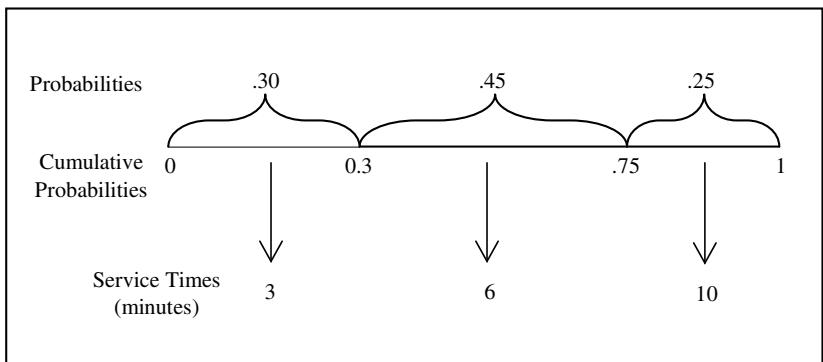 Figure 1 ‘‘Random Dart’’ Transformation from Random Number to Service Time.
In Excel, we might think we could implement this transformation, at least for distributions with a small number of values (here, 3), with a nested IF worksheet function, as in:
This attempt at a solution introduces a grave error. Each reference to the Rnd01() function generates a new random number; the transformation procedure depends on usingjust one random number. (You may want to modify the spreadsheet solution in “Example2.2ServiceTimes.xls” with this incorrect solution to see the resulting probabilities.) This approach can be modified to use two cells, the first to hold the result from Rnd01, the second with a modified IF statement.
A better approach is to use the VBA function called DiscreteEmp() (for discrete empirical, meaning defined by data) supplied with all the examples. To see how this function is used, see the spreadsheet solution, “Example2.2ServiceTimes.xls”; a typical cell for generating a random service time appears as follows:
where $ D$7:$ D$9 is the range of cells containing the cumulative probabilities and $ B$7:$ B$9 is the range of cells containing the desired values for service times. Discrete means that only the values listed will be generated. Each of the two worksheet ranges must be a column vector (meaning al data in one column), with each having the same length, that is, the same number of cells. The “$” in each address in front of each row and column indicates an absolute address rather than a relative address; this makes it easier to copy and paste the formula into all the cells in the “Service Time” column after typing it into just one cell.)
The method used here with the supplied VBA function, DiscreteEmp(), easily generalizes to most of the examples (and exercises) in the chapter that use simple discrete distributions for model inputs. To use DiscreteEmp(), supply two ranges in the worksheet, one for cumulative probabilities and the second for the desired values. It works with any number of values in the distribution.
In future examples, keep Figure 1 in mind; it illustrates exactly how DiscreteEmp() works. Although its VBA implementation involves a loop and may appear complex to a non-programmer, its basic logic is the simple logic of Figure 1 — the simple logic of throwing a dart at a special dar board, the unit interval, and a transformation.
1.6 How to Simulate a Random Arrival Time
In this section our goal is to learn how to generate random interarrival times (times between successive arrivals) and compute arrival times of customers or other entities to a system. The interarrival times, as well as the service times in Example 2, are examples of simulation-generated time durations, called activity times or activities. These are distinguished from arrival times, which are times on a simulation clock representing the time-of-arrival to a facility.
A simulation clock is a key component of every dynamic discrete-event simulation. In all of the Excel spreadsheet solutions, the clock times are labeled just above the appropriate column titles of the simulation table, so that you can easily distinguish between the activity times (service or interarrival times, for example) and the computed clock times. In all cases, a clock time represents the time of occurrence of an event, such as an arrival, a service beginning, or a service completion in a queueing model.
Example 3: Random Arrival Times
Telephone calls to the telephone information service, where service times are defined in Example 2, occur at random times defined by a discrete distribution for which the interarrival times have values 1, 2, 3, or 4 minutes, all with equal probability. Our purpose here is to show how to generate both interarrival times and arrival times.
Since this example has one event, namely, the arrival event, it is our first example of a dynamic, event-based model (despite its simplicity). Dynamic simply means time-based, with system state changing over time; dynamic, event-based means that the model tracks the progression of even occurrences over time.
The interarrival times can be generated randomly in exactly the same manner as done in Example 2 for service times. The spreadsheets, however, supply a second VBA function to simplify random generation from a discrete uniform distribution. Uniform means that all the values have equal probabilities; in this example, all the interarrival times may have one of the values 1, 2, 3, or 4 minutes, each occurring with probability 0.25. For such discrete uniform distributions, the spreadsheets supply the VBA function, DiscreteUniform(), which takes two arguments: either the cell containing the minimum value followed by the cell containing the maximum value of the desired range of integers, or the actual low and high values, as in:
or
The DiscreteUniform(low, high) function is implemented by a single line of VBA code, as follows:
which becomes, for this example:
where Rnd() generates a random number between 0 and 1 (in VBA, it is always less than one bu may equal zero), and Int() is a VBA function that truncates (rounds down) its argument. (Note that 4 * Rnd() generates real values between 0.0 and 3.99999, so that truncating and then adding 1 yields the desired range 1 to 4. Why do we expect equal probabilities?)
Table 3 shows the input specification for interarrival times and a portion of the simulation table, taken from the spreadsheet model in “Example2.3ArrivalTimes.xls”. As shown in Step 1 (row 14), we assume that the first arrival occurs at simulation time 0. (The assumed arrival time for the firs customer is model-dependent; it could be any other specified time, constant or random.) The interarrival times are randomly and independently generated using the DiscreteUniform(1, 4) function. The arrival times are computed by a simple formula, by adding the current customer’s interarrival time to the previous customer’s arrival time. (You should verify the spreadsheet formula for arrival times.)
Table 3 Input Specification and Simulation Table for Arrival Times.
| A | B | C | D | |
|---|---|---|---|---|
| 4 | Interarrival Times(minutes) | |||
| 5 | ||||
| 6 | Minimum | 1 | ||
| 7 | Maximum | 4 | ||
| 8 | ||||
| 9 | Number of Callers= | 25 | ||
| 10 | Simulation Table | |||
| 11 | Step | Activity | Clock | |
| 12 | Caller | Interarrival Time | Arrival Time | |
| 13 | ||||
| 14 | 1 | 0 | ||
| 15 | 2 | 2 | 2 | |
| 16 | 3 | 1 | 3 | |
| 17 | 4 | 3 | 6 |
Example 3 is the first that contains an event, namely, the arrival event, and the event time associated with that event, namely, the CLOCK time for the time of arrival. Note that Table 3 distinguishes the activity times from the CLOCK times.
1.7 A Framework for Spreadsheet Simulation
The simulation table provides the structure, and the steps outlined below provide a set of general guidelines for carrying out a spreadsheet simulation. We have seen several examples of a simulation table, with Table 3 in Example 3 being the best so far—since it contains a clock time for the arrival event, making it one of the simplest possible dynamic, event-based simulations.
First, the model developer must define the model inputs, the system states, and the mode outputs. Inputs are the exogenous variables that are (usually) defined independently of other system characteristics; examples include the probability of a head on a coin toss, the service time and the interarrival time distributions in a queueing system, or the demand distribution in an inventory model. These input specifications are used to generate random activity times and other random variables. Other inputs, such as policy or decision parameters, may be constants.
Outputs are used to compute measures of system performance (also known as model responses, or simply responses). For example, an output could be an individual customer’s waiting time in a queue, or the cost of an individual transaction in an inventory system. The associated responses might be average waiting time in a queue, or the average cost per unit time in an inventory system, respectively.
Each simulation table is custom designed for the problem at hand. Each column in the table is one of the following types:
An activity time associated with a model input;
Any other random variable defined by a model input;
A system state;
An event, or the clock time of an event;
A model output;
Sometimes, a model response.
For the spreadsheet simulations here, the above-listed items are sufficient.
In general, model responses, also known as measures of system performance, are computed outside the simulation table after the simulation has been completed. For example, in a waiting line model, the delay in queue of each individual customer is a model output, while the average delay over all customers is a model response. The model output is tracked in the simulation table; the response is computed afterwards.
An activity time is a time defined by a constant or a statistical distribution, such as a service time, or an interarrival time. An activity is a duration of time, in contrast to event times, which are clock times.
System states include, for example, server status (busy or idle) in a queueing model and inventory levels in an inventory model. In general, the set of system states includes any information needed for the simulation to proceed through time (or from one step to the next), as well as any quantity or information that makes the simulation logic simpler or more transparent and thus easier to understand. The greatest simplicity possible, as long as the model logic is correct, assists in an ease of understanding that is of tremendous value, especially when trying to verify that a model’s logic is indeed correct.
Table 4 A Generic Simulation Table
| Step | Activities and System States | Outputs | |||||
|---|---|---|---|---|---|---|---|
| 1 | |||||||
| 2 | |||||||
| 3 | |||||||
| . | |||||||
| . | |||||||
| . | |||||||
| n |
Each row in the simulation table represents a step in the simulation and is usually associated with the occurrence of one or more events, or the progress of one entity (such as a customer) through the system. The simulation table is designed so that a given step depends solely on model inputs and/or one or more previous steps or previously computed values in the current step.
In general, a modeler develops and runs a spreadsheet or manual simulation by following these guidelines:
Determine the characteristics of each of the inputs to the simulation. Often encountered types of inputs include constants as well as probability distributions.
Determine the activities, events, and system states relevant to the problem.
Determine model responses or summary performance measures, depending on objectives and specific questions to meet those objectives.
Determine the model outputs needed for computing model responses.
Construct a simulation table. A generic representation of a simulation table is shown in Table 4. In this table, there are p activities and system states,, and one output, y_i, for each simulation step . Initialize the table by filling in the data for Step 1. When doing a spreadsheet model, the initial step or steps (usually just Step 1) are typically different from subsequent steps, which are defined by formulas.
For each Step i, generate a value for each of the activities, then compute the system states and outputs y . Random input values may be computed by sampling values from the distributions chosen in Step 1. An output typically depends on the inputs, system states, and possibly other outputs.
When the simulation is finished, use the outputs to compute the model responses or measures of performance.
In the following sections, we will see several examples of spreadsheet simulations carried out in a custom-designed simulation table. These include examples of a coin tossing game, plus examples in application areas such as queueing, inventory, reliability, and network analysis. The coin tossing game asks an easy question yet has an answer that we believe will be surprising to most readers.
The two queueing examples provide illustrations of single-server and two-server systems. The first ofthe inventory examples involves a problem that has a closed-form solution; thus, the simulation solution can be compared to the mathematical solution. The second inventory example pertains to the classic order-level model.
The remaining examples include a model of hitting a target, a reliability model, a Monte Carlo model to estimate the distribution of a complex random variable, namely, lead-time demand, and finally, a model of a project activity network. The target hitting model introduces the use of normally distributed random numbers.
2 A Coin Tossing Game
In a coin tossing game, is it more likely that you and your opponent each share the lead about 1/2 of the time (that is, on about 1/2 of the tosses), compared to, say, one of you being ahead most of the time?
With the following example, we explain in more detail the layout of the spreadsheet solutions, the two main worksheets (‘One Trial’ and ‘Experiment’), the buttons to run the simulations, and the terminology used: trials (or replications) and experiments. The details of model logic (formulas used, functions called, and so on) are explained in the spreadsheet itself, all of which can be found at the text’s web site, www.bcnn.net.
Example 4: A Coin Tossing Game
Charlize tosses a coin for her friends, Harry and Tom, exactly 100 times. Harry wins $1.00 when a head lands up, and Tom loses $1.00. Tom wins when the coin lands with tails up, with Harry paying $1. Charlize tracks their respective wins and losses as they play the game. On any toss, Harry could be ahead, or Tom could be ahead, or they could be even.
On any game (a game being exactly 100 tosses), is it more likely that both Harry and Tom are each ahead on about 1/2 of the tosses, or is it more likely that one of the two is ahead most of the time?
Note that we are not asking about winnings at the end of the game; we are not asking about the proportion of heads versus tails (which, as you know, should be close to 50:50 in the long run). The question concerns how often Harry or Tom is ahead or behind during the course of the game. Note also that the two possibilities in the question are not the only two possible results of a game; therefore, their probabilities will not add up to 1.
To be specific, which of these is more likely, and by about how much?
(A) Harry and Tom are each ahead on about 1/2 of the tosses; specifically, Harry is ahead on 45 to 55 of the tosses, and thus Tom is also ahead on 45 to 55 of the tosses; or
(B) Harry is ahead on 95 or more tosses; or
(C) Harry is ahead on 5 or fewer tosses.
Guess before looking at the results. Table 5 shows the input specifications and the first 14 tosses in the simulation table, taken from the spreadsheet model in “Example2.4CoinTossGame.xls” when using the default seed (12,345) and clicking the button ‘Reset Seed & Run’. The ‘One Trial’worksheet has the logic and results for one game of 100 tosses.
Table 5 Input Specification and Simulation Table for the Coin Tossing Game
| A | B | C | D | |
|---|---|---|---|---|
| 4 | Coin | Probability | Cumulative Probability | |
| 5 | ||||
| 6 | ||||
| 7 | Head | 0.50 | 0.50 | |
| 8 | Tail | 0.50 | 1.00 | |
| 9 | ||||
| 10 | Numer of Tosses = 100 | |||
| 11 | Simulation Table | |||
| 12 | Step | State | Output | |
| 13 | Toss | Result of Toss | Harry's Winnings | |
| 14 | 1 | T | -$1 | |
| 15 | 2 | H | 0 | |
| 16 | 3 | T | -1 | |
| 17 | 4 | H | 0 | |
| 18 | 5 | H | 1 | |
| 19 | 6 | T | 0 | |
| 20 | 7 | H | 1 | |
| 21 | 8 | T | 0 | |
| 22 | 9 | T | -1 | |
| 23 | 10 | H | 0 | |
| 24 | 11 | T | -1 | |
| 25 | 12 | H | 0 | |
| 26 | 13 | T | -1 |
If you inspect the ‘One Trial’worksheet in the spreadsheet solution (for the trial using the default seed for the RNG), you will see that on toss 13, Harry’s winnings are negative (he’s losing money) and they stay negative for the remainder of the game; in fact, in this game, Tom is ahead on 92 of the 100 tosses, yet his winnings at the end are just $6.00. Harry is ahead on just 2 of the 100 tosses, and they are even on 6 of the 100 tosses (the last time on toss 12).
Now, we cannot answer the questions asked by playing just one game (equivalent to clicking the ‘Generate New Trial’ button once, since each trial is one game of 100 tosses). To play many games, we use the ‘Experiment’ worksheet and set the Number of Trials (cell C3) to 400. (Any fairly large number of trials will do for our present purposes.) Then click the button labeled ‘Reset Seed & Run’, which sets the seed to its default value (12,345) and runs the experiment with this seed. Running the experiment means that the ‘One Trial’ worksheet is executed 400 times, and after each trial, the result of the trial is recorded in the ‘Experiment’ worksheet. The spreadsheet contains comments and explanations for the formulas, functions, and other technical details for implementing model logic and collecting the desired outputs.
Table 6 Experiment Worksheet for the Coin Tossing Game
| A | B | C | D | E | F | |
|---|---|---|---|---|---|---|
| 3 | Number of Trials: 400 | |||||
| 4 | Link to Measure of Performance: | |||||
| 5 | Name of Measure: Link | |||||
| 6 | Number of Tosses out of 100 on which Harry is Ahead. 31 | |||||
| 7 | ||||||
| 8 | ||||||
| 9 | Response Table | Multi-Trial Summary | ||||
| 10 | Trial | Number Tosses w/ Harry Ahead | Bins | Frequency | Relative Frequency | |
| 11 | 1 | 2 | 0 to 5 | 73 | 18.3% | |
| 12 | 2 | 91 | 45 to 55 | 28 | 7.0% | |
| 13 | 3 | 1 | 95 to 100 | 46 | 11.5% | |
| 14 | 4 | 76 | ||||
| 15 | 5 | 17 | ||||
| 16 | 6 | 11 | Average | 48.2 | ||
| 17 | 7 | 94 | Median | 50 | ||
| 18 | 8 | 95 | ||||
| 19 | 9 | 78 | Minimum | 0 | ||
| 20 | 10 | 0 | Maximum | 100 | ||
| 21 | 11 | 40 |
Table 6 shows the experimental specification (400 trials and the response) plus the Response Table for the first 11 trials (first 11 games), plus the Multi-Trial Summary. Figure 2 shows the histogram based on the frequency results in the Multi-Trial Summary.
Based on the experiment with 400 trials (or replications), the results may appear surprising to many people:
Harry behind most ofthe time In 73 of the 400 games (18.3%), Harry is ahead on 5 or fewer of the 100 tosses.
Harry and Tom about the same In 28 of the 400 games (7.0%), Harry and Tom share the lead abou equally.
Harry ahead most ofthe time In 46 of the 400 games (11.5%), Harry is ahead on 95 or more of the 100 tosses.
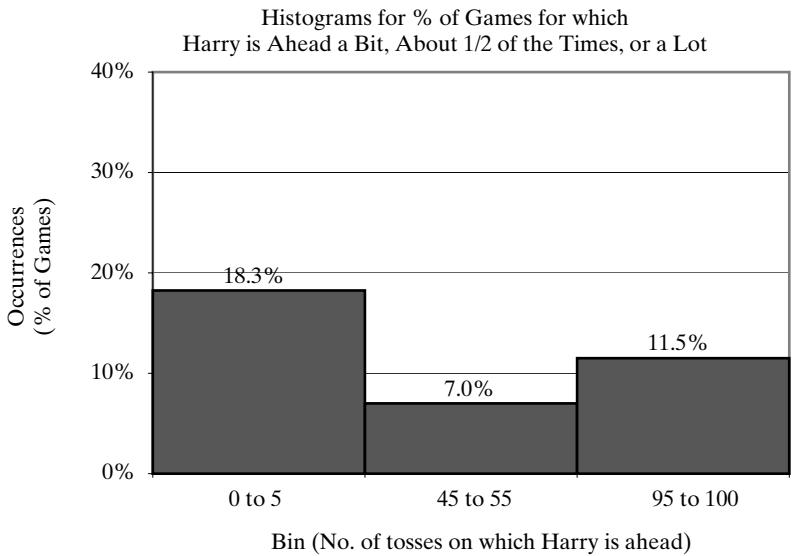 Figure 2 Histogram for Harry’s Chances of Being Ahead.
Of course, these three possibilities are not the only possibilities; that is why the frequencies do not add up to 400 games or 100%.You may wonder: What explains that the result “0 to 5” appears to be more likely than “95 to 100”, and that both are more likely than Tom and Harry sharing the lead about half of the time? What about the magnitude of this difference? Do these results contradict the assumption that the coins are “fair” and heads and tails have equal probability? Do these results say anything about Harry or Tom’s final winnings or losses?
You may experiment by clicking the ‘Run Experiment’ button several times, to see how the results vary from one experiment to the next. With 400 games constituting each experiment, it seems intuitively that the results would not change too much. One run of the experiment is identical to an other except that a new set of random numbers is used. (You can always return to the original random numbers and original results presented here by clicking the ‘Reset Seed & Run’ button.) To verify the results quoted here based on 400 games (i.e., 400 trials), you could run an experiment with a very large number, say, 4000 trials. Accuracy increases as the number of trials increases.
3 Queueing Simulation in a Spreadsheet
We begin by describing the components of queueing or waiting line models. We follow with two examples: a single-server queue and a two-server queue; both are dynamic, event-based models.
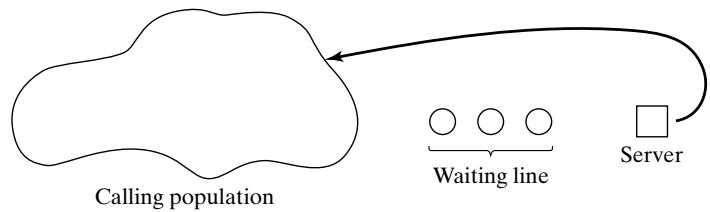 Figure 3 Single-channel queueing system.
3.1 Waiting Line Models
A queueing system is described by its calling population, the nature of the arrivals, the service mechanism, the system capacity, and the queueing discipline. A simple single-channel queueing system is portrayed in Figure 3. The members of the calling population may be, for example, customers, telephone calls, or jobs in a repair shop; here, we refer to them as units.
In the simple models in this chapter, we assume an unlimited potential calling population and a constant arrival rate. That is, no matter how many units have already arrived or are still present in the system, the interarrival time until the next arrival follows the same statistical distribution. Arrivals for service occur one at a time in a random fashion; once they join the waiting line, they are eventually served. In addition, service times are of some random length according to a probability distribution which does not change over time. The system capacity has no limit, meaning that any number of units can wait in line. Finally, units are served in the order of their arrival (often called FIFO: firs in, first out, or FCFS: first come, first served) by a single server or multiple parallel servers.
Services and arrivals are defined by the distribution of service times and the distribution of time between arrivals, respectively, as illustrated by Examples 2 and 3. For any simple single- or multi-channel queue, the overall effective arrival rate must be less than the total service rate, or the waiting line will grow without bound. When queues grow without bound, they are termed explosive or unstable. (In some re-entrant queueing networks in which units return a number of times to the same server before finally exiting from the system, the condition that arrival rate be less than service rate might not guarantee stability. See Harrison and Nguyen [1995] for more explanation. Interestingly, this type of instability was noticed first, not in theory, but in actual manufacturing in semiconductor manufacturing plants.) More complex situations can occur—for example, arrival rates that are greater than service rates for short periods of time, or networks of queues with routing. However, this chapter sticks to the most basic queues.
How do the concepts of system state, events, and simulation clock apply to queueing models? System state for a queueing model typically consists of the number of units in the system and server status, either busy or idle. An event is a set of circumstances that causes an instantaneous change in the state of the system. In a single-channel (or any multi-channel) queueing system, the events are the arrival event, the service beginning event, and the departure event, also called the service completion event. The simulation clock is used to track simulated time.
When a departure event occurs, the simulation proceeds in the manner shown in the flow diagram of Figure 4. The departure event causes the system state to change. If there are no units waiting in the queue, server status changes to idle; if there are one or more units waiting, the next unit begins service. In both cases, the number of units in the system decreases by one.
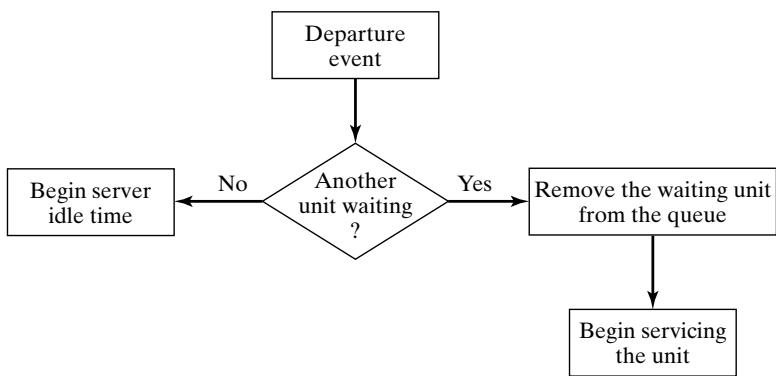 Figure 4 Departure event flow diagram.
The flow diagram for the arrival event is shown in Figure 5. The unit finds the server either idle or busy; therefore, either the unit begins service immediately, or it enters the queue. The unit follows the course of action shown in Figure 6. If the server is busy, the unit enters the queue. If the server is idle and the queue is empty, the unit begins service. It is not possible for the server to be idle while the queue is nonempty.
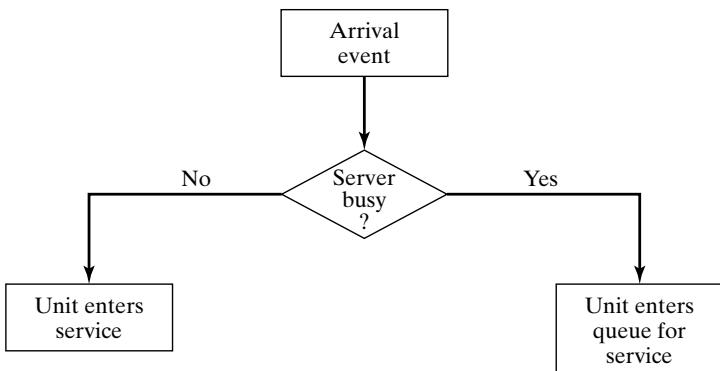 Figure 5 Arrival event flow diagram.
| Queue status | |||
|---|---|---|---|
| Not empty | Empty | ||
| Server status | Busy | Enter queue | Enter queue |
| Idle | Impossible | Enter service | |
| Server outcomes | Busy | Impossible | |
| Idle | Impossible |
Figure 6 Potential unit actions upon arrival.
Figure 7 Server outcomes after the completion of service.
After a service completion, the server either becomes idle or remains busy with the next unit. The relationship of these two outcomes to queue status is shown in Figure 7. If the queue is no empty, another unit engages the server, which then remains in the busy state. If the queue is empty, the server becomes idle. These two possibilities are shown as the shaded portions of Figure 7.
In most simulations, many events occur at random times, the randomness imitating uncertainty in real life. For example, it is not known with certainty when the next customer will arrive at a grocery checkout counter, or how long the bank teller will take to complete a transaction. In these cases, a statistical model of the data is developed either from data collected and analyzed or from subjective estimates and assumptions. For our purposes, we will assume simple discrete probability distributions for interarrival and service times.
Now, how can the events described here occur in simulated time? Simulations of queueing systems generally require the maintenance of an event list for determining what happens next. The event list tracks the future times at which the different types of events will occur. This chapter simplifies the simulation by tracking each unit explicitly. Note that this ad hoc approach is satisfactory for simple simulations in a spreadsheet, but the more systematic approach is essential for the more complex real-world simulations (and even the more interesting student simulations).
Table 7 was designed as a simulation table specifically for a single-channel queue that serves customers on a first-in–first-out (FIFO) basis. It keeps track of the clock time at which each even occurs. (Note that it contains no columns for outputs; these will be added in the next example.) This simulation table computes arrival times from an assumed sequence of interarrival times:
24126
Columns B, C, and E are simulation clock times. Column B, the arrival times, are computed solely from the generated interarrival times. Column E, the time for the departure (or service completion) event, is easily computed by the generated input in Column D and the time service begins in Column C. Thus we see that computing Column C, the time service begins, is the main challenge. For an arriving unit, service begins at the later of two times: its arrival time or the departure time of the previous unit. (For 2-server and other multi-server queues, it is not quite so easy to compute the service completion time.)
As shown in Table 7, the first customer arrives at clock time 0 and immediately begins service, which requires two minutes. Service is completed at clock time 2. The second customer arrives at clock time 2 and is finished at clock time 3. Note that the fourth customer arrived at clock time 7, bu service could not begin until clock time 9. This occurred because customer 3 did not finish service until clock time 9.
Table 7 Simulation Table Emphasizing Clock Times
| A | B | C | D | E |
|---|---|---|---|---|
| Customer Number | Arrival Time (Clock) | Time Service Begins (Clock) | Service Time (Activity) | Time Service Ends (Clock) |
| 1 | 0 | 0 | 2 | 2 |
| 2 | 2 | 2 | 1 | 3 |
| 3 | 6 | 6 | 3 | 9 |
| 4 | 7 | 9 | 2 | 11 |
| 5 | 9 | 11 | 1 | 12 |
| 6 | 15 | 15 | 4 | 19 |
Table 8 Chronological Ordering of Events
| Event Type | Customer Number | Clock Time |
|---|---|---|
| Arrival | 1 | 0 |
| Departure | 1 | 2 |
| Arrival | 2 | 2 |
| Departure | 2 | 3 |
| Arrival | 3 | 6 |
| Arrival | 4 | 7 |
| Departure | 3 | 9 |
| Arrival | 5 | 9 |
| Departure | 4 | 11 |
| Departure | 5 | 12 |
| Arrival | 6 | 15 |
| Departure | 6 | 19 |
The occurrence of the arrival and departure events in chronological order is shown in Table 8 and Figure 8. While Table 8 is ordered by clock time, the events may or may not be ordered by customer number. The chronological ordering of events is the basis of the approach to discrete-even simulation.
Figure 8 depicts the number of customers in the system over time. It is a visual image of the event listing of Table 8. Customer 1 is in the system from clock time 0 to clock time 2. Customer 2 arrives at clock time 2 and departs at clock time 3. No customers are in the system from clock time 3 to clock time 6. During some time periods, two customers are in the system, such as at clock time 8, when customers 3 and 4 are both in the system. Also, there are times when events occur simultaneously, such as at clock time 9, when customer 5 arrives and customer 3 departs.
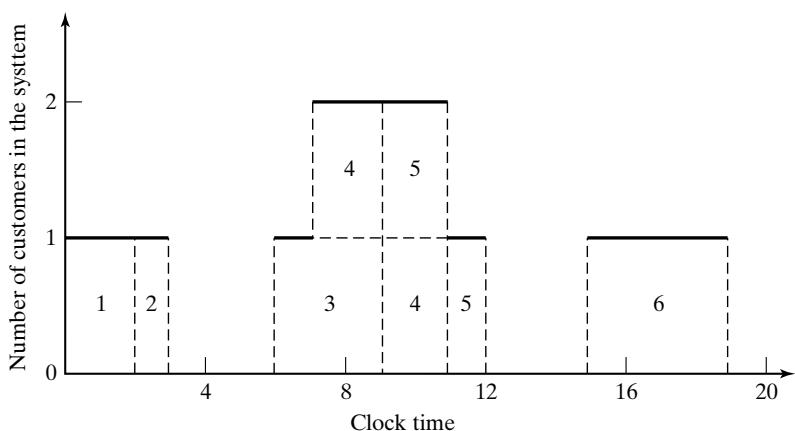 Figure 8 Number of customers in the system.
3.2 Simulating a Single-Server Queue
The first queueing example is a single-server queue. We illustrate how to compute typical outputs and performance measures, such as the customer’s average waiting time and the proportion of time the server is idle.
Example 5: The Grocery Checkout, a Single-Server Queue
A small grocery store has one checkout counter. Customers arrive at the checkout counter at random times that range from 1 to 8 minutes apart. We assume that interarrival times are integer-valued with each of the 8 values having equal probability; this is a discrete uniform distribution, as shown in Table 9. The service times vary from 1 to 6 minutes (also integer-valued), with the probabilities shown in Table 10. Our objective is to analyze the system by simulating the arrival and service of 100 customers and to compute a variety of typical measures of performance for queueing models.
In actuality, 100 customers may be too small a sample size to draw reliable conclusions. Depending on our objectives, the accuracy of the results may be enhanced by increasing the sample size (number of customers), or by running multiple trials (or replications). A second issue is that o initial conditions. A simulation of a grocery store that starts with an empty system may or may not be realistic unless the intention is to model the system from startup or to model until steady-state operation is reached. Here, to keep calculations simple, the starting conditions are an empty grocery, and any concerns are overlooked.
Table 9 Distribution of Time Between Arrivals
| G | H | |
|---|---|---|
| 4 | Interarrival Times(minutes) | |
| 5 | ||
| 6 | Minimum | 1 |
| 7 | Maximum | 8 |
Table 10 Distribution of Service Times
| A | B | C | D | |
|---|---|---|---|---|
| 4 | Service Times (Minutes) | Probability | Cumulative Probability | |
| 5 | ||||
| 6 | ||||
| 7 | 1 | 0.10 | 0.10 | |
| 8 | 2 | 0.20 | 0.30 | |
| 9 | 3 | 0.30 | 0.60 | |
| 10 | 4 | 0.25 | 0.85 | |
| 11 | 5 | 0.10 | 0.95 | |
| 12 | 6 | 0.05 | 1.00 |
How to generate service times and arrival times from the service time and interarrival time distributions has been covered in Sections 1.5 and 1.6, respectively; the same methods apply here and in subsequent examples. For manual simulations, use the random numbers in Table A.1 in the Appendix. It is good practice to start at a random position in Table A.1 and proceed in a systematic direction, never reusing the same stream of numbers in a given problem. If the same pattern is used repeatedly, statistical bias or other odd effects could affect the results.
Table 11 shows a portion of the simulation table for the single-channel queue, taken from “Example2.5SingleServer.xls”; it also shows totals and averages for selected columns (above the simulation table). The first step is to initialize the table by filling in cells for the first customer, who is assumed to arrive at time 0 with service beginning immediately. The customer finishes at time 2 minutes (the first random service time). After the first customer, subsequent rows in the table are based on the randomly generated values for interarrival time and service time of the current customer, the completion time of the previous customer, and, for the spreadsheet solution, the simulation logic incorporated in the formulas in the cells of the simulation table.
Continuing, the second customer arrives at time 5 minutes and service begins immediately. Therefore, the second customer has no wait in the queue and the server has 3 minutes of idle time.
Skipping down, we see that the fifth customer arrives at time 16 minutes and finds the server busy. At time 18, the previous customer leaves and the fifth customer begins service, having waited 2 minutes in the queue. This process continues for all 100 customers. The spreadsheet solution in “Example2.5SingleServer.xls” contains the formulas that implement the steps described here. To best understand these formulas, you should first attempt to do a manual simulation of a few steps, figure out the logic, and then study how the formulas implement the logic.
Columns G, I, and J have been added to collect three model outputs, namely, each customer’s time in queue and in system, and the server’s idle time (if any) between the previous customer’s departure and this customer’s arrival time. These model outputs are, in turn, used to compute severa measures of performance, namely, the customer’s average time in queue and in system, and the proportion of time the server is idle.
In order to compute the system performance measures, we can use the calculated responses in Table 11, which shows totals and averages for interarrival times, service times, the time customers wait in the queue, the time customers spend in the system, and idle time of the server. These results are taken from the first trial run on the ‘One Trial’ worksheet of the spreadsheet model when using the default RNG seed (12,345). With these results, we can illustrate a number of typical performance measures for waiting line models:
Ta ble 11 M od e l Res _po n ses a n d S i m u l at i o n Ta b l e (fi rst 11 cu sto m e rs) fo r t h e G roce r_y Sto re S i m u l at i o n
| A | B | C | D | E | F | G | H | I | J | |
|---|---|---|---|---|---|---|---|---|---|---|
| 15 | TOTALS | 420 | 320 | 163 | 483 | 106 | ||||
| 16 | AVERAGES | 4.24 | 3.20 | 1.63 | 4.83 | 1.07 | ||||
| 17 | Number of Customers= | 100 | ||||||||
| 18 | Simulation Table | |||||||||
| 19 | Step | Activity | Clock | Activity | Clock | Output | Clock | Output | Output | |
| 20 | Customer | Interarrival Time (Minutes) | Arrival Time | Service Time (Minutes) | Time Service Begins | Waiting Time in Queue (Minutes) | Time Service Ends | Time Customer Spends in System (Minutes) | Idle Time of Server (Minutes) | |
| 21 | ||||||||||
| 22 | ||||||||||
| 23 | 1 | 0 | 0 | 2 | 0 | 0 | 2 | 2 | ||
| 24 | 2 | 5 | 5 | 2 | 5 | 0 | 7 | 2 | 3 | |
| 25 | 3 | 5 | 10 | 4 | 10 | 0 | 14 | 4 | 3 | |
| 26 | 4 | 4 | 14 | 4 | 14 | 0 | 18 | 4 | 0 | |
| 27 | 5 | 2 | 16 | 3 | 18 | 2 | 21 | 5 | 0 | |
| 28 | 6 | 8 | 24 | 2 | 24 | 0 | 26 | 2 | 3 | |
| 29 | 7 | 7 | 31 | 3 | 31 | 0 | 34 | 3 | 5 | |
| 30 | 8 | 8 | 39 | 5 | 39 | 0 | 44 | 5 | 5 | |
| 31 | 9 | 5 | 44 | 1 | 44 | 0 | 45 | 1 | 0 | |
| 32 | 10 | 2 | 46 | 6 | 46 | 0 | 52 | 6 | 1 | |
| 33 | 11 | 1 | 47 | 4 | 52 | 5 | 56 | 9 | 0 |
- The average waiting time for a customer is 1.63 minutes, computed as follows:
- The probability that a customer has to wait in the queue is 0.46, computed as follows:
- The server is idle about 25% of the time, computed as follows:
Therefore, the server is busy about 75% of the time.
- The average service time is 3.20 minutes, computed as follows:
This result can be compared with the expected service time by finding the mean of the service-time distribution, using the equation
Applying the expected-value equation to the distribution in Table 10 gives
The expected service time is exactly the same as the average service time from this trial of the simulation. In general, this will not be true; here it is a pure coincidence.
- The average time between arrivals is 4.24 minutes, computed as follows:
Since the first arrival occurs at time 0, we divide by 99 rather than 100. This result can be compared to the expected time between arrivals by finding the mean of the discrete uniform distribution whose endpoints are a 1 and The mean is given by
The expected time between arrivals is slightly higher than the average. However, as the simulation becomes longer, the average value of the time between arrivals tends to become closer to the theoretical mean,6. The average waiting time of those who wait is 3.54 minutes, computed as follows:
Note that this is different from the average waiting time of all customers, many of whom (54 in this simulation) have no wait at all before their service begins. Over all customers, the average waiting time is minutes.The number who wait, 46, comes from the simulation table, column G under “Waiting Time in Queue,” by counting the number of nonzero waiting times, or alternately from Figure 9, which displays a histogram of the 100 waiting times.
- The average time a customer spends in the system is 4.83 minutes, computed in two ways. First:
The second way is to realize that the following relationship must hold:
Frequency of Individual Customer Waiting Time in Queue
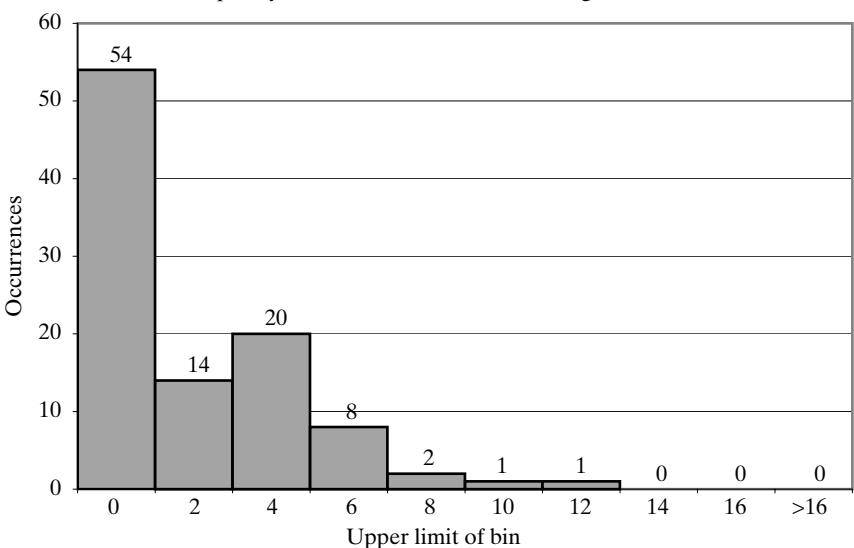 Figure 9 Frequency of waiting time in queue.
From findings 1 and 4, this results in
Average time customer spends in the system 1.633.204.83 minutes
We are now interested in running an experiment to address the question of how the average time in queue for the first 100 customers varies from day to day. Running the ‘One Trial’ workshee once with 100 customers corresponds to one day. Running it 50 times corresponds to using the ‘Experiment’ worksheet with “Number of Trials” set to 50, where each trial represents one day.
For Example 5, the frequency of waiting time in queue for the first trial of 100 customers is shown in Figure 9. (Note: In all histograms in the remainder of this chapter, the upper limit of the bin is indicated on the legend on the x-axis, even if the legend is shown centered within the bin.) As shown in the histogram, 54% of the customers did not have to wait, and of those who did wait, 34% waited less than four minutes (but more than zero minutes). These results and the histogram in Figure 9 represent the results of one trial, and by themselves do not constitute an answer to our question.
To answer our question, we use the ‘Experiment’sheet, setting “Number ofTrials” to 50 and click the button labeled ‘Reset Seed & Run’. This results in 50 estimates of average time in queue (each averaged over 100 customers). The overall average waiting time over 50 trials was 1.32 minutes. Figure 10 shows a histogram of the 50 average waiting times for the 50 trials. This shows how average waiting time varies day-by-day over a sample of 50 days.
By experimenting with the spreadsheet solution and doing some of the related exercises, you can discover the effects of randomness and of the assumed input data. For example, what if you run 400 trials, or 10 trials, instead of 50? How much does the shape of the distribution in Figure 10 change the number of trials? Why is the range (0 to 12 minutes) in Figure 9 so much wider than the range (0.5 to 3 minutes) in Figure 10?
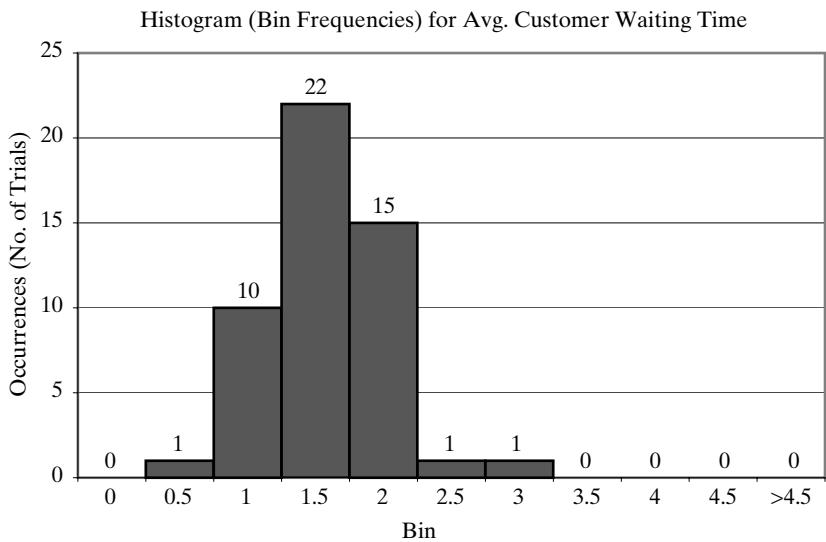 Figure 10 Frequency distribution of average waiting times for 50 trials.
3.3 Simulating a Queue with Two Servers
The second queueing example is a queue with two servers that have different service times.
Example 6: The Able–Baker Call Center Problem
A computer technical support center is staffed by two people, Able and Baker, who take calls and try to answer questions and solve computer problems. The time between calls ranges from 1 to 4 minutes, with distribution as shown in Table 12. Able is more experienced and can provide service faster than Baker. The distributions of their service times are shown in Tables 13 and 14.
When both are idle, Able takes the call. If both are busy, the call goes on hold; this is basically the same as a customer having to wait in line in any queueing model. In general, arrival times, service times, and hence clock times in a simulation should be continuous (real-valued) variables; the fac that they are discrete, integer-valued here (and in other examples) is simply for ease of explanation as well as understanding the random variable generation techniques explained earlier.
Table 12 Interarrival Distribution of Calls for Technical Support
| B | C | D | |
|---|---|---|---|
| 4 | Interarrival Distribution of Calls | ||
| 5 | Interarrival Time (Minutes) | Probability | Cumulative Probability |
| 6 | |||
| 7 | |||
| 8 | 1 | 0.25 | 0.25 |
| 9 | 2 | 0.40 | 0.65 |
| 10 | 3 | 0.20 | 0.85 |
| 11 | 4 | 0.15 | 1.00 |
Table 13 Distribution of Able’s Service Time
| F | G | H | |
|---|---|---|---|
| 4 | Able's Service Time Distribution | ||
| 5 | Service Times (Minutes) | Probability | Cumulative Probability |
| 6 | |||
| 7 | |||
| 8 | 2 | 0.30 | 0.30 |
| 9 | 3 | 0.28 | 0.58 |
| 10 | 4 | 0.25 | 0.83 |
| 11 | 5 | 0.17 | 1.00 |
Table 14 Distribution of Baker’s Service Time
| I | J | K | |
|---|---|---|---|
| 4 | Baker's Service Time Distribution | ||
| 5 | Service Times (Minutes) | Probability | Cumulative Probability |
| 6 | |||
| 7 | |||
| 8 | 3 | 0.35 | 0.35 |
| 9 | 4 | 0.25 | 0.60 |
| 10 | 5 | 0.20 | 0.80 |
| 11 | 6 | 0.20 | 1.00 |
The simulation proceeds in a manner similar to the single-server case in Example 5, excep that the underlying logic (the spreadsheet formulas in the simulation table) is more complex for two reasons: There are two servers, and the two servers have different service times. The complete solution is in the workbook “Example2.6AbleBaker.xls”, a portion of which is shown in Table 15, along with some totals needed to estimate caller delay (hold time). The workbook provides a detailed explanation of the simulation steps, including the underlying logic (formulas) for computing each step. (To understand the steps, it would first be helpful for you to do a manual simulation, perhaps by starting with a simulation table containing Step 1 (row 20) and the columns for interarrival and service times, and attempting to match the results in Table 15.)
Our objective is to estimate caller delay (hold time) waiting for Able or Baker to answer. To estimate this and other desired measures of system performance, a simulation of the first 100 callers is made.
Looking at Table 15, we see that Caller 1, by assumption, arrives at clock time 0. Able is idle, so Caller 1 begins service immediately. The service time, 4 minutes, is generated from the distribution given in Table 13 by following the procedure (throwing the “random dart”) in Example 2. Thus, Caller 1 completes service at clock time 4 minutes and is not delayed.
Ta b l e 15 S i m u l at i o n Ta b l e fo r Ca l l -Ce nte r Exa m _p l e (fi rst 10 of 1 00 ca l l e rs)
| B | C | D | E | F | G | H | I | J | K | L | M | |
|---|---|---|---|---|---|---|---|---|---|---|---|---|
| 13 | TOTALS | 73 | 432 | |||||||||
| 14 | Number of Callers= | 100 | Seed for Random Numbers | 12,345 | ||||||||
| 15 | Simulation Table | |||||||||||
| 16 | Step | Activity | Clock | Clock | Clock | State | Activity | Clock | Clock | Clock | Output | Output |
| 17 | Caller Number | Interarrival Time (Minutes) | Arrival Time | When Able Available | When Baker Available | Server Chosen | Service Time (Minutes) | Time Service Begins | Service Completion Time | Caller Delay (Minutes) | Time in System (Minutes) | |
| 18 | Able | Baker | ||||||||||
| 19 | ||||||||||||
| 20 | 1 | 0 | 0 | 0 | Able | 4 | 0 | 4 | 0 | 4 | ||
| 21 | 2 | 1 | 1 | 4 | 0 | Baker | 4 | 1 | 5 | 0 | 4 | |
| 22 | 3 | 1 | 2 | 4 | 5 | Able | 3 | 4 | 7 | 2 | 5 | |
| 23 | 4 | 3 | 5 | 7 | 5 | Baker | 3 | 5 | 8 | 0 | 3 | |
| 24 | 5 | 2 | 7 | 7 | 8 | Able | 5 | 7 | 12 | 0 | 5 | |
| 25 | 6 | 2 | 9 | 12 | 8 | Baker | 5 | 9 | 14 | 0 | 5 | |
| 26 | 7 | 1 | 10 | 12 | 14 | Able | 5 | 12 | 17 | 2 | 7 | |
| 27 | 8 | 2 | 12 | 17 | 14 | Baker | 4 | 14 | 18 | 2 | 6 | |
| 28 | 9 | 4 | 16 | 17 | 18 | Able | 2 | 17 | 19 | 1 | 3 | |
| 29 | 10 | 1 | 17 | 19 | 18 | Baker | 3 | 18 | 21 | 1 | 4 |
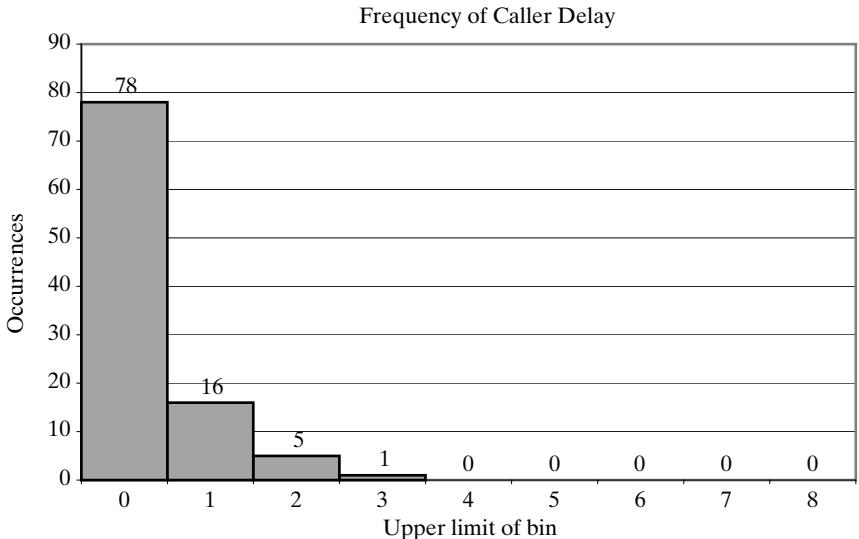 Figure 11 Frequency of caller delay for first trial.
An interarrival time of 1 minute, generated from Table 12 by following the procedure in Example 3, makes Caller 2 arrive at clock time 1 minute. Able is busy, so Caller 2 is served by Baker.
Looking at Caller 3, serviced by Able from clock time 4 minutes to clock time 7 minutes, we see that Caller 3 arrived at time 2 minutes to find both servers busy, hence had to wait.
For the single trial of 100 callers, the frequency chart in Figure 11 shows that 78 of 100 (78%) of the callers had no delay, 16% had a delay of one minute, while a few had to wait up to 3 minutes. Other trials, using different random numbers, might get similar or vastly different results; only experimentation can determine the inherent variability when simulating 100 customers.
The distribution of caller delay in Figure 11 is skewed to the right. On the ‘One Trial’ sheet, click the button ‘Generate New Trial’ repeatedly and note that the caller delay distribution often has a long, thin tail to the right. Along with the tall bars (high frequency) close to zero, what does this say about the nature of caller delay? One trial does not provide sufficient data on which to form reliable conclusions, but this is one of the great advantages to having the spreadsheet—the effec of variability is quite evident—and the simulation can be repeated any number of times using the ‘Experiment’ worksheet.
In Table 15, total customer delay is 73 minutes, or about 0.73 minutes per caller on the average. The histogram in Figure 11 shows, however, that the average of 0.73 minutes by itself is not a good indicator of how long a caller has to wait for Able or Baker. While 78% of the customers in this tria experienced no delay, a few experienced delays up to 3 minutes. This illustrates the importance of choosing the proper measures of system performance, depending on the model’s goals and objectives. After all, the callers who do not have to wait will not complain about waiting, but those who wai a long time will not care that the average was 0.73 minutes. (In actuality, in some later trials, the average delay is considerably higher, and the distribution is skewed even more to the right. You should click ‘Generate New Trial’ several times to see how much random variability this system may exhibit. Each trial represents a different day.)
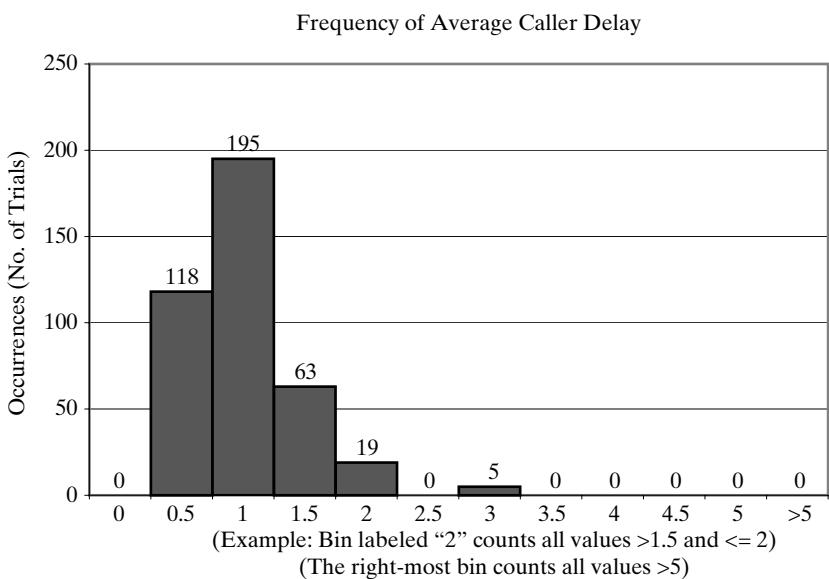 Figure 12 Frequency of average caller delay for experiment of 400 trials.
Next, we ask the question: How does average caller delay (for the first 100 customers) vary from day to day? Using the ‘Experiment’ worksheet, and associating each day as one trial, we set the “Number of Trials” to 400 (representing 400 days). The resulting distribution of average caller delay is shown in the histogram in Figure 12. Note that this histogram is not a histogram of individua caller delay, as in Figure 11.
From Figure 12, we see that about 22% of the average delays (87 of 400) are longer than one minute, and about 78% (313 of 400) are 1 minute or less. Only about 1.25% (5 of 400) are longer than 2 minutes. We see that the result of the first trial (an average caller delay of 0.73 minutes) falls in the most frequent bin, but there are days that have much higher average delays. This example shows that a one-day (one trial) simulation may well be unrepresentative of long-term system performance.
In summary, whether, and to what extent, Able and Baker can handle the demand for service depends on your criteria, and the cost or value of the delays customers experience. We can guess that adding an additional server may well reduce caller delay (hold time) to nearly zero; however, the benefit of reduced customer delay would have to be traded off against the cost of an additiona server.
4 Inventory Simulation in a Spreadsheet
An important class of simulation problems involves inventory systems. The simple inventory system shown in Figure 13 is called an (M, N) system, which has an inventory review every N time periods and maximum inventory level M. At each N time units, the inventory level is checked and an order is made to bring the inventory up to the level M.
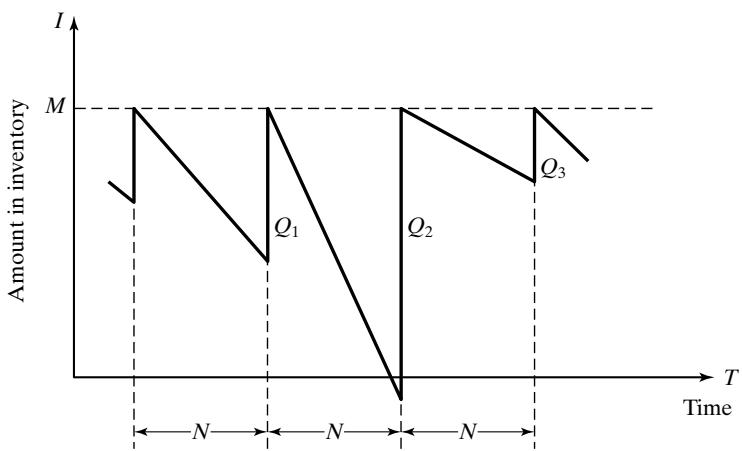 Figure 13 Probabilistic order-level inventory system.
For simplicity, the lead time (i.e., the length of time between the placement and receipt of an order) is shown as zero in Figure 13; orders arrive immediately after being placed. In reality, lead time may vary greatly and would need to be modeled as a known constant or as a random variable.
Demands are not usually known with certainty, so the order quantities are modeled by a probability distribution. In the graph of Figure 13, demand is shown as being uniform over the time period. In actuality, demands are not usually uniform and do fluctuate over time.
At the end of the first review period, an order quantity,, is placed to bring the inventory leve up to M. This is repeated at every inventory review.
Notice that, in the second cycle, the amount in inventory drops below zero, indicating a shortage. In Figure 13, these units are backordered; when the order arrives, the demand for the backordered items is satisfied first. To avoid shortages, a buffer, or safety, stock would need to be carried. In some inventory systems, a portion of sales may be lost rather than backordered when inventory runs out.
Inventory systems have a number of potential sources of revenue and costs:
Revenue from sales;
Cost of items sold;
Carrying cost, the cost of carrying stock in inventory;
Ordering cost, the cost associated with placing orders;
Cost of lost sales or backorders;
Cost due to scrap;
Salvage revenue from scrap or other damaged goods.
The carrying cost can be attributed to the interest paid on funds borrowed to buy the items (or equivalently, the loss from not having the funds available for other investment purposes). Carrying costs also include the cost for handling and storage space, hiring of guards, and other similar costs. Ordering cost may include shipping and transportation, and discounts depending on order quantity.
When trying to improve an inventory system, you face a number of trade-offs. An alternative to carrying high inventory (with high carrying costs) is to make more frequent reviews and, consequently, more frequent purchases or replenishments. This has an associated cost, the ordering cost. There may also be costs associated with running out of goods, with such shortages causing customers to become angry and a subsequent loss of good will. Larger inventories decrease the probability of a shortage. By varying the policy or decision parameters, the costs may be traded off in order to minimize the total cost of an inventory system.
The total cost (or total profit) of an inventory system is the measure of performance. This can be affected by the policy alternatives. For example, in Figure 13, the decision maker can control the maximum inventory level, M, and the length of the cycle, N.
Inventory systems and policies have a number of parameters, some controllable and some not. The controllable variables are the decision or policy variables. For each item in inventory, these include:
The maximum inventory level, M
The review period, N
The order quantity (for replenishment), Q
Lead time for replenishment, L
Lead time may be random when it cannot be controlled; in other situations, lead time may be tightly controlled, in effect a known constant (as in a just-in-time manufacturing system when ordering parts or components), in which case it becomes a policy variable.
In a model of an (M, N) inventory system, the events that may occur are the demand for items in the inventory, the review of the inventory position and resulting decision to place a replenishment order, and the arrival ofreplenishment stock. When the lead time is assumed to be zero, as in Figure 13, the last two events occur at the same time.
In the examples and exercises, we simulate a variety of inventory systems and policies.
4.1 Simulating the News Dealer’s Problem
In the following example, a news dealer must decide how many newspapers to buy. In this and similar problems, only a single time period of specified length is relevant, and only a single procurement is made. Inventory remaining at the end of the single time period is sold for scrap, discarded or recycled. A wide variety of real-world problems have similar characteristics, including the stocking of certain spare parts, perishable items, style goods, and special seasonal items [Hadley and Whitin, 1963].
Example 7: The News Dealer’s Problem
A news dealer buys papers for 33 cents each and sells them for 50 cents each. Newspapers not sold at the end of the day are sold as scrap for 5 cents each. Newspapers can be purchased in bundles of 10. Thus, the newsstand can buy 50 or 60 or 70 papers, and so on. The order quantity, Q, is the only policy decision. Unlike some inventory problems, the order quantity Q is fixed since ending inventory is always zero due to scrapping leftover papers.
Table 16 Distribution of Daily Newspaper Demand, by Type of Newsday
| B | C | D | E | F | G | H | |
|---|---|---|---|---|---|---|---|
| 4 | Distribution of Newspapers Demanded | ||||||
| 5 | Demand | Demand Probabilities | Cumulative Probabilities | ||||
| 6 | Good | Fair | Poor | Good | Fair | Poor | |
| 7 | 40 | 0.03 | 0.10 | 0.44 | 0.03 | 0.10 | 0.44 |
| 8 | 50 | 0.05 | 0.18 | 0.22 | 0.08 | 0.28 | 0.66 |
| 9 | 60 | 0.15 | 0.40 | 0.16 | 0.23 | 0.68 | 0.82 |
| 10 | 70 | 0.20 | 0.20 | 0.12 | 0.43 | 0.88 | 0.94 |
| 11 | 80 | 0.35 | 0.08 | 0.06 | 0.78 | 0.96 | 1.00 |
| 12 | 90 | 0.15 | 0.04 | 0.00 | 0.93 | 1.00 | 1.00 |
| 13 | 100 | 0.07 | 0.00 | 0.00 | 1.00 | 1.00 | 1.00 |
There are three types of newsdays: “good”, “fair”, and “poor”, but the news dealer cannot predict which type will occur on any given day. Table 16 gives the distribution of newspapers demanded by type of day. Table 17 provides the distribution for type of newsday.
Our objective is to compute the optimal number of papers the newsstand should purchase (the order quantity, Q). This will be accomplished by simulating demands for 20 days (in the ‘One Trial’ worksheet) and recording profits from sales each day for a given order quantity. After a tria is completed, total profit (the model response or performance measure) is calculated. To complete the experiment, we use the ‘Experiment’ sheet to replicate some number of times for a given order quantity (for example, 70 papers). Finally, we vary the order quantity over some reasonable range (40, 50, 60, 70, and so on) and compare different order policies based on total profit over the 20-day period.
Daily profit is given by the following relationship:
Since the revenue from sales is 50 cents per paper, and the cost to the dealer is 33 cents per paper, the lost profit from excess demand is 17 cents for each paper demanded that could not be provided.
Table 17 Distribution of Type of Newsday
| J | K | L | |
|---|---|---|---|
| 4 | Type of Newsday | ||
| 5 | Type | Probability | Cumulative Probability |
| 6 | |||
| 7 | Good | 0.35 | 0.35 |
| 8 | Fair | 0.45 | 0.80 |
| 9 | Poor | 0.20 | 1.00 |
Table 18 Simulation Table for Purchase of 70 Newspapers
| B | C | D | E | F | G | HI | I | |
|---|---|---|---|---|---|---|---|---|
| 16 | Simulation Table | |||||||
| 17 | Day | Type of Newsday | Demand | Revenue from Sales | Lost Profit from Excess Demand | Salvage from Sale of Scrap | Daily Cost | Daily Profit |
| 18 | ||||||||
| 19 | ||||||||
| 20 | 1 | Fair | 50 | $25.00 | $0.00 | $1.00 | $23.10 | $2.90 |
| 21 | 2 | Fair | 50 | $25.00 | $0.00 | $1.00 | $23.10 | $2.90 |
| 22 | 3 | Fair | 70 | $35.00 | $0.00 | $0.00 | $23.10 | $11.90 |
| 23 | 4 | Good | 80 | $35.00 | $1.70 | $0.00 | $23.10 | $10.20 |
| 24 | 5 | Poor | 40 | $20.00 | $0.00 | $1.50 | $23.10 | -$1.60 |
| 25 | 6 | Fair | 50 | $25.00 | $0.00 | $1.00 | $23.10 | $2.90 |
| 26 | 7 | Poor | 50 | $25.00 | $0.00 | $1.00 | $23.10 | $2.90 |
| 27 | 8 | Fair | 70 | $35.00 | $0.00 | $0.00 | $23.10 | $11.90 |
| 28 | 9 | Good | 40 | $20.00 | $0.00 | $1.50 | $23.10 | -$1.60 |
| 29 | 10 | Good | 100 | $35.00 | $5.10 | $0.00 | $23.10 | $6.80 |
| 30 | 11 | Fair | 70 | $35.00 | $0.00 | $0.00 | $23.10 | $11.90 |
| 31 | 12 | Poor | 50 | $25.00 | $0.00 | $1.00 | $23.10 | $2.90 |
| 32 | 13 | Fair | 50 | $25.00 | $0.00 | $1.00 | $23.10 | $2.90 |
| 33 | 14 | Poor | 40 | $20.00 | $0.00 | $1.50 | $23.10 | -$1.60 |
| 34 | 15 | Good | 80 | $35.00 | $1.70 | $0.00 | $23.10 | $10.20 |
| 35 | 16 | Good | 70 | $35.00 | $0.00 | $0.00 | $23.10 | $11.90 |
| 36 | 17 | Good | 80 | $35.00 | $1.70 | $0.00 | $23.10 | $10.20 |
| 37 | 18 | Poor | 40 | $20.00 | $0.00 | $1.50 | $23.10 | -$1.60 |
| 38 | 19 | Fair | 70 | $35.00 | $0.00 | $0.00 | $23.10 | $11.90 |
| 39 | 20 | Good | 100 | $35.00 | $5.10 | $0.00 | $23.10 | $6.80 |
| 40 | TOTAL PROFIT = | $114.70 |
Such a shortage cost is somewhat controversial, but makes the problem much more interesting. The salvage value of scrap papers is 5 cents each.
The simulation table for the decision to purchase 70 newspapers, taken from the solution workbook, “Example2.7NewsDealer.xls”, is shown in Table 18. On day 1, the demand is for 50 newspapers, so with 70 available, there are 20 to scrap. The revenue from the sale of the 50 newspapers is $25.00, and the scrap value is $1.00, so the first-day profit is computed as follows:
The profit from other days is easily computed in the same manner. The profit for the 20-day period is the sum of the daily profits, $114.70, as shown in Table 18. In general, because the results of one day are independent of previous days, inventory problems of this type are much easier than queueing problems to solve in a spreadsheet.
With the ‘Experiment’ worksheet from “Example2.7NewsDealer.xls”, we set up an experimen with 400 trials or replications for the order policy of ordering 70 newspapers. Figure 14 shows the result of these 400 trials, each trial being a 20-day simulation run. The average total (20-day) profit was $135.49 (averaged over the 400 trials). The minimum 20-day profit was $86.60 and the maximum was $198.00. Figure 14 shows that only 38 of the 400 trials resulted in a total 20-day profit of more than $160. (Recall that the number beneath a bin is the upper limit of the bin.)
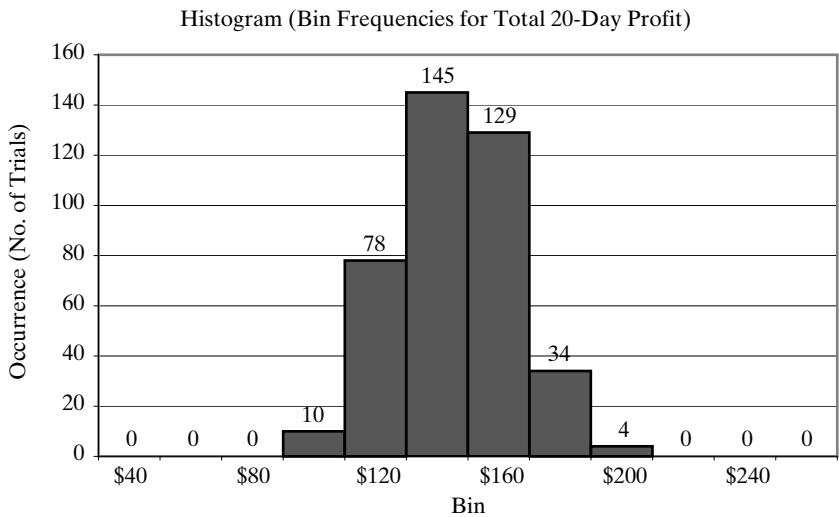 Figure 14 Frequency of total (20-day) profit when news dealer orders 70 papers per day.
The single trial shown in Table 18 had a profit of $114.70, which is on the low side of the distribution in Figure 14. This illustrates once again that the result for one 20-day trial may not be representative of long-term performance, and shows the necessity of simulating a number of trials as well as conducting a careful statistical analysis before drawing conclusions.
On the ‘One Trial’ sheet, look how Daily Profit varies when clicking the button ‘Generate New Trial’ multiple times. The results vary quite a bit both in the histogram entitled ‘Frequency of Daily Profit’ (showing what happened on each of the 20 days) and in the total profit over those 20 days. Figure 15 shows four typical histograms for daily profit from the first four trials, whose shape varies quite a bit more than the shape for the histogram for total 20-day profit.
Exercise 28 asks you to conduct an experiment to determine the optimum number of newspapers for the news dealer to order. To solve this problem by simulation requires setting a policy of buying a certain number of papers each day and running the experiment for a large number of trials. The policy (number of newspapers purchased) is changed to other values in a reasonable range (say, 40, 50, 60, and so on) and the simulation repeated until the best value is found. To estimate with confidence whether a simulated difference is likely to be real and not a random fluke, requires additional statistical methods
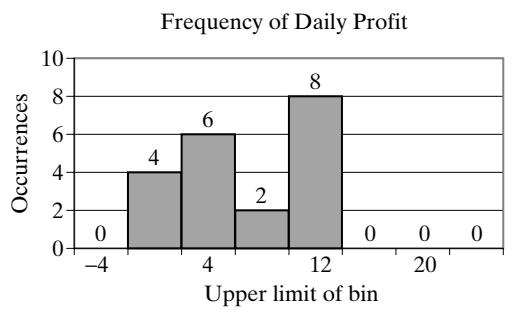
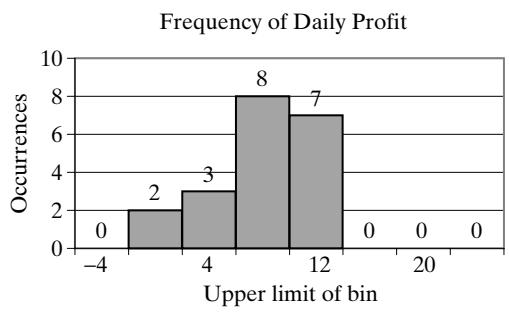
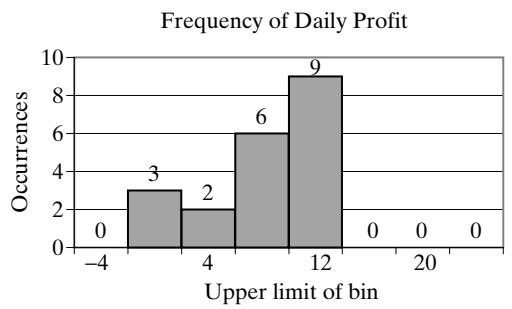
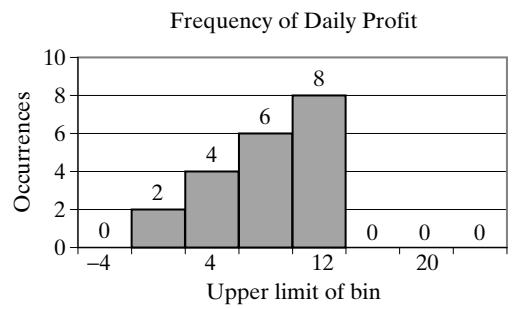 Figure 15 Four typical histograms of daily profit for the News Dealer’s Problem.
4.2 Simulating an (M, N) Inventory Policy
The next example is the classic order-up-to-level (M, N) inventory policy with a fixed review period (N), a maximum inventory level (M), random demand, and random lead time.
Example 8: A Refrigerator Inventory Problem
A company selling refrigerators maintains inventory by conducting a review after a fixed number of days (say N) and making a decision about how many to order to replenish the store’s inventory. The current policy is to order up to a level (the order up to level—say, M), using the following relationship:
For example, if the order-up-to level (M) is 11 refrigerators, the review period (N) is five days, and the ending inventory on day 5 is 3 refrigerators, then on the fifth day of the cycle, 8 refrigerators will be ordered from the supplier. On the other hand, if there had been a shortage of two refrigerators on the fifth day, then 13 refrigerators would have been ordered; the first two received would be provided to the customers who placed an order and were willing to wait (a so-called backorder). (In contrast, the lost sales case occurs when customer demand is lost if inventory is not available.)
The daily demand, or number of refrigerators purchased each day by customers, is randomly distributed as shown in Table 19. After the company places an order to replenish their supply, the lead time is 1 to 3 days, randomly distributed, as shown in Table 20. Assume that the orders are placed at the end of the day. With a lead time of zero, the order from the supplier will arrive the next morning, and the refrigerators will be available for distribution that next day. With a lead time of one day (the smallest possibility in Table 20), the order from the supplier arrives the second morning after, and will be available for distribution that day.
Table 19 Distribution of Daily Demand
| B | C | D | |
|---|---|---|---|
| 4 | Distribution of Daily Demand | ||
| 5 | Demand | Probability | Cumulative Probability |
| 6 | |||
| 7 | 0 | 0.10 | 0.10 |
| 8 | 1 | 0.25 | 0.35 |
| 9 | 2 | 0.35 | 0.70 |
| 10 | 3 | 0.21 | 0.91 |
| 11 | 4 | 0.09 | 1.00 |
Table 20 Distribution of Lead Time
| F | G | H | |
|---|---|---|---|
| 4 | Distribution of Lead Time | ||
| 5 | Lead Time (days) | Probability | Cumulative Probability |
| 6 | |||
| 7 | 1 | 0.60 | 0.60 |
| 8 | 2 | 0.30 | 0.90 |
| 9 | 3 | 0.10 | 1.00 |
The simulation table for the policy to order-up-to 11 refrigerators, shown in Table 21, is taken from the spreadsheet solution in “Example2.8RefrigInventory.xls”. The simulation was started with assumed initial conditions as follows: a beginning inventory of 3 refrigerators and a previous replenishment order for 8 refrigerators to arrive in 2 days’ time. (These values can be changed in the spreadsheet solution, if desired.)
Following the simulation table for several selected days indicates the simulation logic. The order for 8 refrigerators is available on the morning of the third day of the first cycle, raising the inventory level from zero refrigerators to 8 refrigerators. Demands during the remainder of the firs cycle reduced the ending inventory level to 3 refrigerators at the end of the fifth day. Thus, an order for 8 refrigerators was placed; the lead time turns out to be 2 days. This order is added to inventory on the morning of day 7 in cycle 2.
Note that on day 10, there is a shortage, resulting in a backorder and an order for 13 refrigerators. Since the lead time is 2 days, additional shortages occur before the order arrives, so that when the order of 13 refrigerators does arrive, the backorders plus current demand take inventory down to 6.
From the simulation of 25 days, representing 5 inventory review periods, the average ending inventory is approximately 2.76 (69/25) units. On 5 of 25 days, a shortage condition existed.
Ta ble 21 S i m u l at i o n Ta b l e fo r I nve nto r_y Po l i c_y with O rd e r- U _p-To 11 Refri _g e rato rs
| B | C | D | E | F | G | H | I | J | K | |
|---|---|---|---|---|---|---|---|---|---|---|
| 13 | Simulation Table | |||||||||
| 14 | Step | State | State | State | Input | State | State | State | Activity | State |
| 15 | Clock | Cycle | Day within Cycle | Beginning Inventory | Demand | Ending Inventory | Shortage Quantity | Pending Order (Quantity) | Lead Time (days) | Days until Order Arrives |
| 16 | Day | |||||||||
| 17 | ||||||||||
| 18 | 0 | 0 | 5 | - | - | 3 | 0 | 8 | 2 | 2 |
| 19 | 1 | 1 | 1 | 3 | 2 | 1 | 0 | 8 | 1 | |
| 20 | 2 | 1 | 2 | 1 | 1 | 0 | 0 | |||
| 21 | 3 | 1 | 3 | 8 | 2 | 6 | 0 | |||
| 22 | 4 | 1 | 4 | 6 | 1 | 5 | 0 | |||
| 23 | 5 | 1 | 5 | 5 | 2 | 3 | 0 | 8 | 1 | 1 |
| 24 | 6 | 2 | 1 | 3 | 3 | 0 | 0 | |||
| 25 | 7 | 2 | 2 | 8 | 2 | 6 | 0 | |||
| 26 | 8 | 2 | 3 | 6 | 3 | 3 | 0 | |||
| 27 | 9 | 2 | 4 | 3 | 2 | 1 | 0 | |||
| 28 | 10 | 2 | 5 | 1 | 3 | 0 | 2 | 13 | 2 | 2 |
| 29 | 11 | 3 | 1 | 0 | 1 | 0 | 3 | 13 | 1 | |
| 30 | 12 | 3 | 2 | 0 | 2 | 0 | 5 | |||
| 31 | 13 | 3 | 3 | 13 | 2 | 6 | 0 | |||
| 32 | 14 | 3 | 4 | 6 | 3 | 3 | 0 | |||
| 33 | 15 | 3 | 5 | 3 | 1 | 2 | 0 | 9 | 1 | 1 |
| 34 | 16 | 4 | 1 | 2 | 0 | 2 | 0 | |||
| 35 | 17 | 4 | 2 | 11 | 4 | 7 | 0 | |||
| 36 | 18 | 4 | 3 | 7 | 2 | 5 | 0 | |||
| 37 | 19 | 4 | 4 | 5 | 3 | 2 | 0 | |||
| 38 | 20 | 4 | 5 | 2 | 3 | 0 | 1 | 12 | 1 | 1 |
| 39 | 21 | 5 | 1 | 0 | 2 | 0 | 3 | |||
| 40 | 22 | 5 | 2 | 12 | 1 | 8 | 0 | |||
| 41 | 23 | 5 | 3 | 8 | 4 | 4 | 0 | |||
| 42 | 24 | 5 | 4 | 4 | 1 | 3 | 0 | |||
| 43 | 25 | 5 | 5 | 3 | 1 | 2 | 0 | 9 | 1 | 1 |
| 44 | TOTAL | 69 | 14 | |||||||
| 45 | AVERAGE | 2.04 | 2.76 | 0.56 |
Frequency Distribution for Average Daily Ending Inventory of Refrigerators
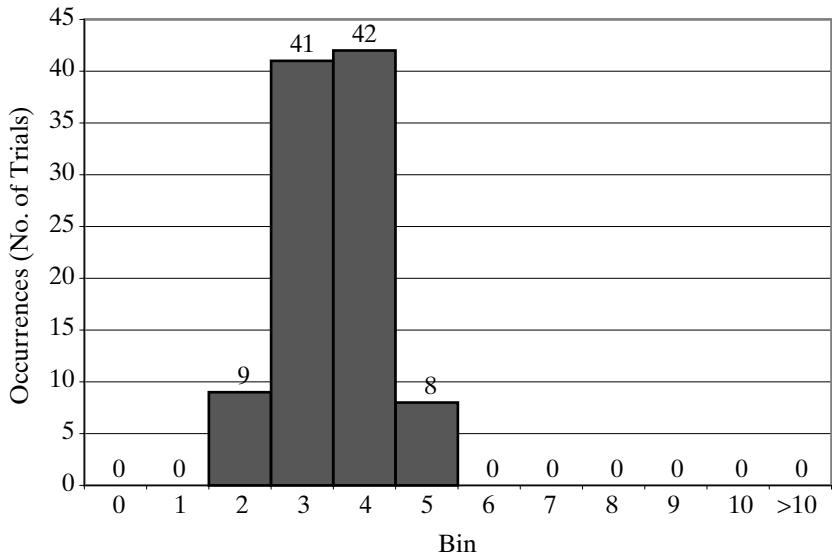 Figure 16 Histogram of 25-day average ending inventory.
In Example 8, there cannot be more than one order outstanding from the supplier at any one time, but there are situations where lead times are so long that the relationship shown so far needs to be modified as follows:
The inclusion of the on-order quantity guarantees that double ordering does not occur.
On the ‘One Trial’ worksheet, repeatedly clicking on ‘Generate New Trial’ will run the nex trial or replication with different random numbers, showing that, for a 25-day simulation, results are highly variable for daily ending inventory. (Watch the histogram change as you run new trials.) In contrast, setting the number of trials to 100 in the ‘Experiment’worksheet and running the experimen repeatedly, by clicking the ‘Run Experiment’ button, produces much less variability in the average daily ending inventory (the average being taken over one trial of 25 days). The 25-day average is usually in the range from 1 to 5 refrigerators, as shown in the resulting histogram in Figure 16. This difference in variability illustrates a well-known fact: averages vary less than individual observations. Which to use in any specific analysis depends on the objectives and questions being asked.
The spreadsheet solution in “Example2.8RefrigInventory.xls” allows you to change the ordering policy (i.e., the values of M and N). It also allows you to make some changes to the statistica distributions for daily demand and lead time, as long as certain restrictions are met: the lead time must be one or more days, the review period must be larger than the largest lead time, and possibly other limitations; otherwise, the formulas implementing the logic may be incorrect.
5 Other Examples of Simulation
This section includes four miscellaneous examples: a reliability problem, a bombing mission, the estimation of the distribution of lead-time demand, and a project activity network.
5.1 Simulation of a Reliability Problem
The next example compares two replacement policies for replacing bearings in a milling machine. The example is a Monte Carlo simulation, not a dynamic event-based model, since events and clock times are not included. Each bearing life is randomly generated 15 times and the resulting costs computed.
Example 9: Replacing Bearings in a Milling Machine
A milling machine has three different bearings that fail in service. The distribution of the life of each bearing is identical, as shown in Table 22. When a bearing fails, the mill stops, a mechanic is called, and he or she installs a new bearing (costing $32 per bearing). The delay time for the mechanic to arrive varies randomly, having the distribution given in Table 23. Downtime for the mill is estimated to cost $10 per minute. The direct on-site cost of the mechanic is $30 per hour. The mechanic takes 20 minutes to change one bearing, 30 minutes to change two bearings, and 40 minutes to change three bearings. The engineering staff has proposed a new policy to replace al three bearings whenever one bearing fails. Management needs an evaluation of the proposal, using total cost per 10,000 bearing-hours as the measure of performance.
Table 22 Distribution for Bearing Life
| B | C | D | |
|---|---|---|---|
| 3 | Distribution of Bearing-Life | ||
| 4 | Bearing Life | Probability | Cumulative Probability |
| 5 | |||
| 6 | 1000 | 0.10 | 0.1 |
| 7 | 1100 | 0.13 | 0.23 |
| 8 | 1200 | 0.25 | 0.48 |
| 9 | 1300 | 0.13 | 0.61 |
| 10 | 1400 | 0.09 | 0.70 |
| 11 | 1500 | 0.12 | 0.82 |
| 12 | 1600 | 0.02 | 0.84 |
| 13 | 1700 | 0.06 | 0.90 |
| 14 | 1800 | 0.05 | 0.95 |
| 15 | 1900 | 0.05 | 1.00 |
Table 23 Distribution of Delay until Mechanic Arrives
| F | G | H | |
|---|---|---|---|
| 4 | Distribution of Delay Time | ||
| 5 | Delay Time | Probability | Cumulative Probability |
| 6 | |||
| 7 | 5 | 0.60 | 0.60 |
| 8 | 10 | 0.30 | 0.90 |
| 9 | 15 | 0.10 | 1.00 |
Table 24 Bearing Replacement under Current Method
| B | C | D | E | F | G | H | |
|---|---|---|---|---|---|---|---|
| 17 | Simulation Table | ||||||
| 18 | Step | Bearing 1 | Bearing 2 | Bearing3 | |||
| 19 | Life (Hours) | Delay (minutes) | Life (Hours) | Delay (minutes) | Life (Hours) | Delay (minutes) | |
| 20 | |||||||
| 21 | 1 | 1000 | 5 | 1700 | 10 | 1300 | 10 |
| 22 | 2 | 1200 | 5 | 1100 | 5 | 1100 | 5 |
| 23 | 3 | 1200 | 10 | 1000 | 10 | 1300 | 10 |
| 24 | 4 | 1500 | 5 | 1000 | 10 | 1100 | 15 |
| 25 | 5 | 1700 | 5 | 1900 | 15 | 1200 | 5 |
| 26 | 6 | 1200 | 5 | 1200 | 10 | 1500 | 10 |
| 27 | 7 | 1300 | 5 | 1500 | 5 | 1100 | 10 |
| 28 | 8 | 1700 | 5 | 1700 | 5 | 1400 | 15 |
| 29 | 9 | 1000 | 5 | 1300 | 5 | 1800 | 15 |
| 30 | 10 | 1800 | 10 | 1300 | 5 | 1200 | 5 |
| 31 | 11 | 1200 | 5 | 1100 | 5 | 1500 | 5 |
| 32 | 12 | 1100 | 5 | 1800 | 5 | 1100 | 10 |
| 33 | 13 | 1300 | 10 | 1200 | 5 | 1700 | 10 |
| 34 | 14 | 1300 | 10 | 1100 | 5 | 1300 | 10 |
| 35 | 15 | 1100 | 5 | 1300 | 5 | 1300 | 10 |
| 36 | TOTALS | 19,600 | 95 | 20,200 | 105 | 19,900 | 145 |
The simulation table for the current policy, shown in Table 24 and taken from the spreadsheet “Example2.9CurrentBearings.xls”, represents a simulation of 15 bearing changes under the current policy of replacing only the single bearing that fails. Note that there are instances where more than one bearing fails at the same time. This is unlikely to occur in practice and is due to the crude simplifying assumption that bearing life is a multiple of 100 hours (so that we could have a simple discrete distribution rather than a more realistic one). Here, we assume that the times are never exactly the same and thus no more than one bearing is changed at any breakdown.
From this single trial (or replication) of the simulation, the cost of the current system is estimated as follows:
The total life of all 45 bearings is hours. Therefore, the tota cost per 10,000 bearing-hours is ($14,340/5.97) $2,402.
The simulation table for the proposed method, shown in Table 25, is taken from the spreadshee “Example2.9ProposedBearings.xls”. For the first set of bearings, the earliest failure is at 1,100 hours.
Table 25 Bearing Replacement under Proposed Method
| B | C | D | E | F | G | |
|---|---|---|---|---|---|---|
| 17 | Simulation Table | |||||
| 18 | Step | Bearing 1 | Bearing 2 | Bearing 3 | FirstFailure(Hours) | |
| 19 | Life(Hours) | Life(Hours) | Life(Hours) | Delay(minutes) | ||
| 20 | ||||||
| 21 | 1 | 1300 | 1100 | 1300 | 1,100 | 10 |
| 22 | 2 | 1100 | 1200 | 1500 | 1,100 | 5 |
| 23 | 3 | 1100 | 1400 | 1800 | 1,100 | 15 |
| 24 | 4 | 1200 | 1500 | 1100 | 1,100 | 10 |
| 25 | 5 | 1700 | 1300 | 1300 | 1,300 | 5 |
| 26 | 6 | 1700 | 1100 | 1000 | 1,000 | 10 |
| 27 | 7 | 1000 | 1900 | 1200 | 1,000 | 10 |
| 28 | 8 | 1500 | 1700 | 1300 | 1,300 | 15 |
| 29 | 9 | 1300 | 1100 | 1800 | 1,100 | 5 |
| 30 | 10 | 1200 | 1100 | 1300 | 1,100 | 5 |
| 31 | 11 | 1000 | 1200 | 1200 | 1,000 | 15 |
| 32 | 12 | 1500 | 1700 | 1200 | 1,200 | 10 |
| 33 | 13 | 1300 | 1700 | 1000 | 1,000 | 10 |
| 34 | 14 | 1800 | 1200 | 1100 | 1,100 | 10 |
| 35 | 15 | 1300 | 1300 | 1100 | 1,100 | 10 |
| 36 | TOTALS | 16600 | 145 |
All three bearings are replaced at that time, even though the remaining bearings had more life in them. For example, Bearing 1 would have lasted 200 additional hours
From this single trial (or replication) of the model, the cost of the proposed policy is estimated as follows:
The total life of the bearings is hours. Therefore, the total cost per 10,000 bearing-hours is ($9,190/4.98) $1,845. The new policy generates a savings of $557 per 10,000 hours of bearing-life.
The spreadsheet solutions for Example 9 are in: “Example2.9CurrentBearings.xls” for the current policy and “Example2.9ProposedBearings.xls” for the proposed policy. In each spreadsheet, a user can change a number of inputs: the distribution of bearing life, the distribution of delay time unti mechanic arrival, the cost parameters, and the repair time per bearing or set of bearings.
5.2 Simulation of Hitting a Target
The next example simulates a bombing mission where the actual location a bomb hits varies from its target by a random amount defined by a normal distribution. The spreadsheet solution has a method for generating these normal random variables; the manual solution uses standard normal numbers from Table A.2 in the Appendix.
For our purposes, recall that a normal distribution (the bell-shaped curve) is symmetric around its mean with a likely range determined by its standard deviation; its use in the next example is a classic use of the normal distribution to represent an error, in this case the deviation from a target. This example is a pure Monte Carlo sampling experiment, since it contains neither events nor clock times; therefore, it is not a dynamic, discrete-event model.
Example 10: A Bombing Mission
Consider a bomber attempting to destroy an ammunition depot, as shown in Figure 17. (This bomber has conventional rather than laser-guided weapons.) If a bomb falls anywhere inside the target, a hi is scored; otherwise, the bomb is a miss. (Note that when a bomb appears visually to have touched a boundary line, it may or may not have hit the target; the model determines mathematically whether a hit has occurred, using the (X, Y) coordinates and the equations of the piecewise-linear boundary of the depot.)
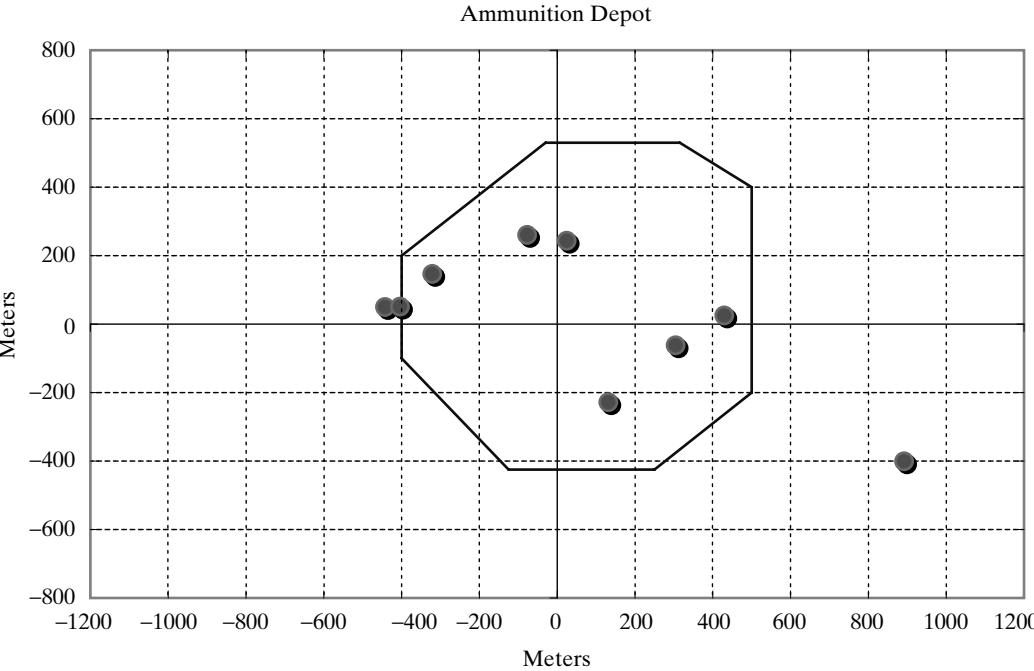 Figure 17 Ammunition depot with 10 bomb locations.
The bomber flies in the horizontal direction and carries 10 bombs. The aiming point is (0,0). The actual point of impact is assumed to be normally distributed around the aiming point with a standard deviation of 400 meters in the direction of flight and 200 meters in the perpendicular direction. The problem is to simulate the operation and estimate the number of bombs on target.
Recall that the standardized normal variate , having mean 0 and standard deviation 1, is distributed as
where is a normal random variable, is the mean of the distribution of X, and σ is the standard deviation of X. Then, with mean zero and standard deviations given by and , we have
where (X, Y) are the simulated coordinates where the bomb hits.
Table 26 Simulated Bombing Run
| F | G | H | I | J | K | L | M | N | O | P | Q | |
|---|---|---|---|---|---|---|---|---|---|---|---|---|
| 3 | Point of Impact of Each Bomb(1-10) | |||||||||||
| 4 | Bomb | 1 | 2 | 3 | 4 | 5 | 6 | 7 | 8 | 9 | 10 | NumberHits |
| 5 | X | 891.8 | -1257.3 | 429.6 | 24.5 | -321.0 | -77.3 | 131.4 | 304.5 | -442.7 | -403.9 | |
| 6 | Y | -400.7 | -159.4 | 25.3 | 243.6 | 146.5 | 260.7 | -228.3 | -62.0 | 49.7 | 51.0 | |
| 7 | Hit ? | Miss | Miss | Hit | Hit | Hit | Hit | Hit | Hit | Miss | Miss | 6 |
The i and j subscripts have been added to indicate that the values of Z should be different for x and y. What are these Z values and where can they be found? The values of Z are random norma numbers with mean zero and standard deviation of one. These can be generated from uniformly distributed random numbers. For our purposes, we can use Table A.2 in the Appendix for manua simulations and the Excel formula listed in Section 1.2 for spreadsheet models.
For example, the first two random normal numbers from Table A.2, are 0.23 and -0.17, which results in (x, y) coordinates for the first bomb of (92.0, 34.0), obtained by multiplying the norma random number by the respective standard deviations of 400 and 200, as shown in the preceding formula.
Table 26 shows the results of one simulated bombing run. For our spreadsheet solution in “Example2.10Target.xls”, we use the worksheet function, NORMSINV(Rnd01()), described in Section 1.2, to generate the normal variates with the desired standard deviation, as follows:
for the x coordinate (where cell E5 contains the standard deviation in the x direction). A similar formula works for the y coordinate.
Using the spreadsheet solution in “Example2.10Target.xls” with the assumed shape and standard deviations, we ran an experiment with 400 trials (each trial being 10 bombs). The histogram in Figure 18 gives the frequency of number of hits, that is, the number of bombing runs on which there were a given number of hits (with number of possible hits ranging from 0 to 10).
From the “Multi-Trial Summary” on the ‘Experiment’ sheet of the spreadsheet model, note tha the actual results range from 2 hits to 10 hits, and the average is 6.77 hits. (Clearly, no hits or one hi are possible. Since we made 400 replications, the experiment suggests, however, that one hit or no hits are extremely unlikely to occur on a bombing mission having the assumed characteristics.) If we simulate only one mission (that is, one trial), a very misleading result could occur, but Figure 18 provides useful descriptive information. For instance, in 17% (68 of 400) of the bombing runs there are 5 or fewer hits. In about 60% of the runs (239 of 400), there were 7 or more hits.
The spreadsheet model in “Example2.10Target.xls” allows you to change the target’s shape by editing the (X, Y) coordinates of each endpoint of each side of the target, so long as a convex shape is maintained. You can also change the standard deviations, with a smaller standard deviation increasing the likelihood of being closer to the target and a larger one increasing the chances of being further from the target. In the spreadsheet solution, whether or not a bomb with a simulated (X, Y) landing spot hits the target is determined by linear inequalities using elementary algebra; the details are explained in the spreadsheet.
Frequency Distribution for Number of Hits in 400 Bombing Missions
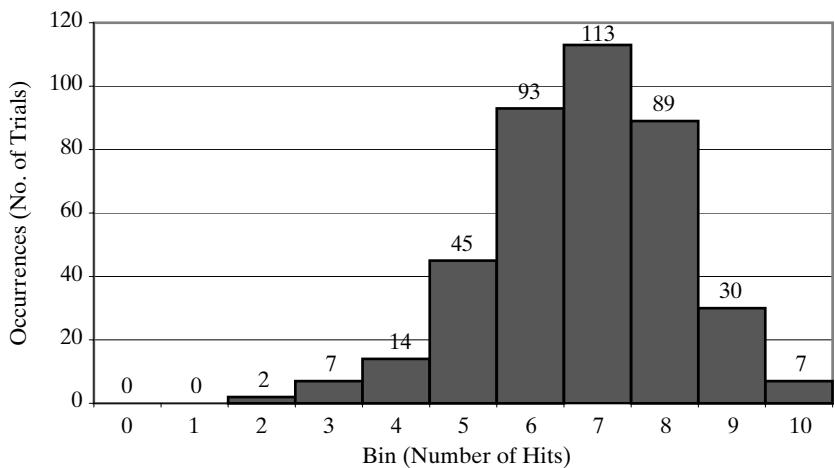 Figure 18 Histogram for number of hits on a bombing mission.
5.3 Estimating the Distribution of Lead-Time Demand
The purpose of the next example is to determine the distribution of lead-time demand, that is, the total demand received over the lead time. Lead time is the time from placement of a replenishmen order until the order is received. During this period, demands continue to arrive from customers. The total customer demand over this period is the lead-time demand.
This model is an example of a Monte Carlo simulation; it is not a dynamic, event-based simulation. Essentially, there are no events and no clock times; it is a pure sampling experiment whose purpose is to estimate a complex statistical distribution. The distribution of lead-time demand is often of use in devising better inventory policies to reduce backorders and lost sales for the least cost.
We assume that both lead time and demand are random variables. Lead-time demand is thus a random variable defined as the sum of the demands over the lead time, or , where T is the lead time and is the demand during the ith time period. The distribution of lead-time demand is found by simulating many cycles of lead time and for each period in the lead time, generating the random demand and totalling it, and building a histogram based on the results.
Example 11: Lead-Time Demand
A firm sells bulk rolls of newsprint. The daily demand is given by the following probability distribution:
| Daily Demand (Rolls) | 3 | 4 | 5 | 6 |
|---|---|---|---|---|
| Probability | 0.20 | 0.35 | 0.30 | 0.15 |
Table 27 Simulation Table for Lead-Time Demand
| B | C | D | E | F | G | |
|---|---|---|---|---|---|---|
| 13 | Simulation Table | |||||
| 14 | Cycle | Lead Time | Demand Day1 | Demand Day2 | Demand Day3 | Lead Time Demand |
| 15 | ||||||
| 16 | ||||||
| 17 | 1 | 2 | 3 | 5 | 8 | |
| 18 | 2 | 1 | 4 | 4 | ||
| 19 | 3 | 2 | 3 | 5 | 8 | |
| 20 | 4 | 3 | 4 | 5 | 4 | 13 |
| 21 | 5 | 3 | 4 | 5 | 6 | 15 |
| 22 | 6 | 1 | 3 | 3 | ||
| 23 | 7 | 1 | 6 | 6 | ||
| 24 | 8 | 2 | 5 | 6 | 11 | |
| 25 | 9 | 2 | 5 | 3 | 8 | |
| 26 | 10 | 3 | 4 | 3 | 5 | 12 |
| 27 | 11 | 1 | 4 | 4 | ||
| 28 | 12 | 1 | 5 | 5 | ||
| 29 | 13 | 3 | 4 | 4 | 14 | |
| 30 | 14 | 1 | 6 | 6 | ||
| 31 | 15 | 1 | 3 | 3 | ||
| 32 | 16 | 2 | 5 | 3 | 8 | |
| 33 | 17 | 2 | 4 | 6 | 10 | |
| 34 | 18 | 3 | 4 | 5 | 5 | 14 |
| 35 | 19 | 3 | 4 | 3 | 6 | 13 |
| 36 | 20 | 2 | 5 | 6 | 11 |
The lead time (the number of days from placing an order until the firm receives the order from the supplier), is a random variable given by the following distribution:
| Lead Time (Days) | 1 | 2 | 3 |
|---|---|---|---|
| Probability | 0.36 | 0.42 | 0.22 |
Table 27 shows the simulation table, taken from “Example2.11LeadTimeDemand.xls”. One feature of this simulation, different from previous ones, is that the number of random demands generated in one cycle is itself random. If a lead time of 2 days is generated, then two random demands are generated and summed; if the lead time is 3 days, then three random demands must be generated and summed.
Using the spreadsheet solution, you can generate many cycles, sum the demands over each cycle to get the lead-time demand, and with the histogram, see the resulting distribution of lead-time demand, as illustrated in Figure 19. This result was obtained by using the ‘One Trial’ worksheet to simulate 20 cycles of lead-time demand by clicking ‘Reset Seed & Run’ in the spreadsheet solution “Example2.11LeadTimeDemand.xls”. By clicking the ‘Generate New Trial’ button several times, you can see how variable the lead-time demand can be over just 20 cycles.
Frequency Distribution for Lead Time Demand over 20 Cycles
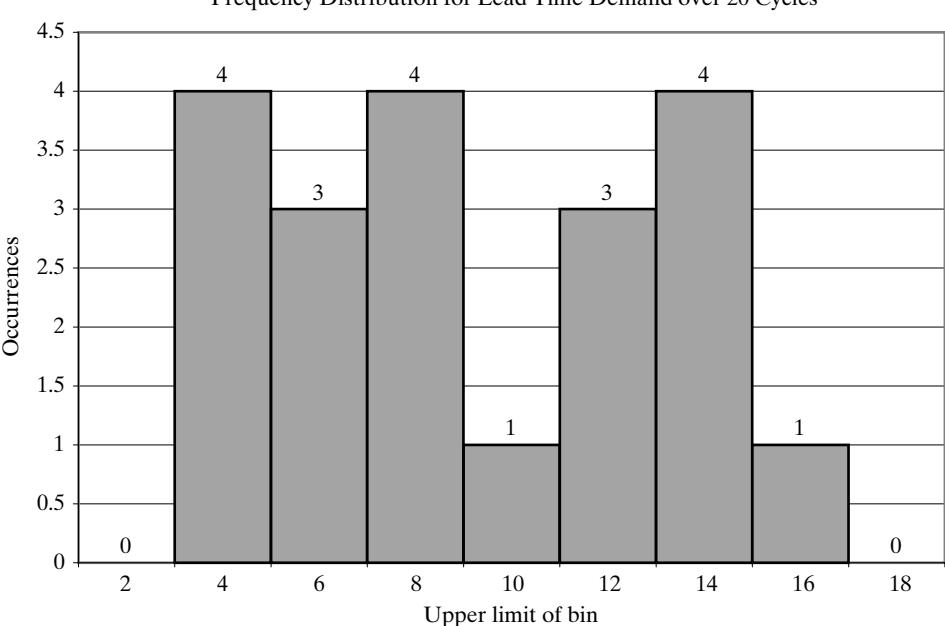 Figure 19 Frequency of lead-time demand.
Compare these results over 20 cycles to the results in the spreadsheet model on the ‘Experiment sheet, which shows the results for 200 trials, each trial being one lead-time demand. This comparison shows that, due to the small sample, the histogram in Figure 19 may not be representative of the shape of the distribution of lead-time demand. This illustrates the importance of having a sample size (number of trials) large enough to obtain accurate estimates of the desired response variable.
5.4 Simulating an Activity Network
Suppose you have a project that requires the completion of a number of activities. Each activity takes a certain amount of time, either constant or random. Some activities must be carried out sequentially, that is, in a specified order; other activities can be done in parallel. The project can be represented by a network of activities, as illustrated by Figure 20. The arcs represent activities and the nodes represent the start or end of an activity.
In the network in Figure 20, there are three paths, each going from the node labeled “Start” to the node labeled “Finish”. Each path represents a sequence of activities that must be completed in order. The activities on different paths can be carried out in parallel. The time for each activity is noted on the arc, where, for example, U(2, 4) represents a random variable that is uniformly distributed between 2 and 4 minutes. The time to complete all activities on a path is the sum of the activity times along the path. To complete the entire project, all activities must be completed; therefore, projec completion time is the maximum over all path completion times.
Unlike any of the previous examples, here we are using a continuous uniform distribution; that is, all values between the lower and upper limit are allowed, not just the integer values. The VBA function, Uniform(), supplied in the add-in file “BCNNvba.xla” and available to any spreadshee model, implements uniform generation in one line of VBA code, in a simple formula that transforms the VBA random number generator Rnd(), which is uniform on 0 to 1, to any other specified range, as follows:
We hope that this simple formula has some intuitive appeal. Basically, since Rnd() is uniform on the unit interval (0, 1), it follows that the function Uniform() will be uniformly distributed on the specified interval (low, high).
Pritsker [1995] was a pioneer in applying simulation techniques to project activity networks. While Example 12 is a Monte Carlo simulation, some activity network models, due to their greater complexity, may be implemented in a discrete-event simulation package or a specialized package designed for such models.
Example 12: Project Simulation
Suppose that three friends want to cook bacon, eggs, and toast for breakfast for some weekend visitors. They divide the work, with each friend preparing one item. Figure 20 represents the sequence of activities, with each path representing the tasks for one person, as follows:
The time to accomplish each activity, being somewhat uncertain, is represented by the uniform distribution shown on the associated arc in Figure 20. The friends want to estimate the distribution of total preparation time so that they can tell the visitor when to be at the breakfast table. With the distribution, and not just the mean or average total preparation time, they can estimate the probability of preparing breakfast within a specified amount of time. The model is in the spreadshee “Example2.12Project.xls”.
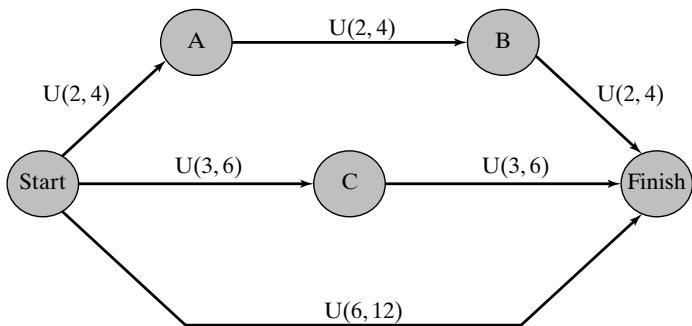 Figure 20 Activity network for Example 12.
Since the mean time for a continuous uniform is the midpoint between the lower and upper limit, you can see that each of the 3 paths in the project network of Figure 20 has a mean of 9 minutes. Based on the lower limit of each uniform, you can see that the minimum time for each path is 6 minutes; similarly, the maximum time is 12 minutes. Do these times provide any help in predicting the total project completion time?
For breakfast preparation, the project completion time is the maximum time over all of the paths. With the spreadsheet solution, “Example2.12Project.xls”, we can sample the task times for a large number of trials and get an idea of the range and distribution of possible project completion times. The ‘One Trial’ worksheet provides the solution for one trial or replication of the network simulation. The logic and formulas implementing it are much simpler than many of the previous examples and we leave those for the student.
With the ‘Experiment’worksheet, we can run many trials and estimate the likely range for project completion time, as well as other statistical measures. We set “Number of Trials” to 400 and run the experiment by clicking the ‘Reset Seed & Run’ button once. With 400 trials and using the default seed, the results are as follows:
Sample Mean: 10.21 minutes
Minimum: 6.65 minutes
Maximum: 11.99 minutes
The so-called critical path is the path that turns out to be the longest on a particular trial; that is, that path’s time is the project completion time. Over 400 trials with each using different random numbers, each path will have some probability of being the critical path. For each of the 400 trials, the experiment determines which path was critical, with these results:
Top path: 25.50% of the trials
Middle path: 32.25%
Bottom path: 42.25%
We conclude that the chance of the bacon being the last item ready is approximately 42.25%. Why aren’t the paths each represented about 1/3 of the time? In addition, how accurate is 42.25%? You can click the ‘Run Experiment’ button several times to get an idea of how variable this estimate tends to be; it varies by a few percent on each click. The magnitude of this random variation depends on the number of trials (400 in this example) in the experiment.
Frequency Distribution of Project Completion Time
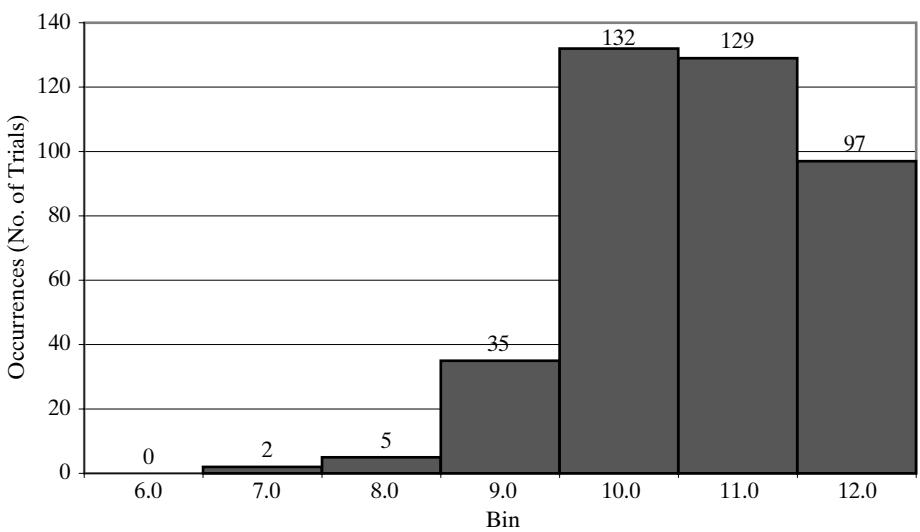 Figure 21 Histogram of project completion times based on 400 trials.
The project completion times were placed in a frequency chart or histogram, shown in Figure 21. From the chart, we draw the following inferences:
The chances are about 10.5% (42 of 400) that breakfast will be ready in 9 minutes or less.
The chances are about 24.25% (97 of 400) that it will take from 11 to 12 minutes.
Note that the bin labeled “12.0” is actually the interval from 11.0 to 12.0 minutes, since the bin labe is always the upper limit of the bin.
Recalling that the mean time along each of the 3 paths is 9 minutes, the histogram tells us that the chance of taking longer than 9 minutes is approximately 89.5%. In other words, the mean of each path tells us little about the distribution of project completion time, which, after all, is determined by the slowest sequence of tasks.
6 Summary
The purpose of this chapter was to introduce a few key simulation concepts by means of examples, to illustrate a few general areas of application.
We used the simulation table, custom designed for each problem, as the organizing principle. The columns in the simulation table represented activity times or other random input (such as demand), clock times for the occurrence of an event, system states, and model outputs. The rows represented a simulation step, for example, a customer or one day’s demand. The formulas in each cell implement the simulation logic, or compute model outputs. The examples illustrate the need for working out the characteristics of the input data, generating random variables from the input assumptions, defining and computing model responses (measures of performance), and analyzing the resulting responses.
Model inputs were defined by constant values for policy and decision parameters, or simple statistical distributions for such variables as service times, interarrival times, lead time, and demand. Separately from the simulation table, but using the model outputs and other data, model responses, also known as system performance measures, were computed based on the results of one trial or one run of the simulation. These model responses included totals, averages, and frequency distributions (used for the histograms).
In the examples, we covered how to generate random samples from four distribution types: the discrete empirical, the discrete uniform, the continuous uniform, and the normal distributions (Empirical means that the distribution is based on data and specified probabilities.) The spreadshee examples, available on the text’s web site at www.bcnn.net, provide VBA functions to generate each type of distribution. You should use these as a starting point for any of the exercises at the end of the chapter.
Events in a simulation table were generated by using the random variables and the logic (formulas) of the particular model. The queueing examples, especially the two-channel queue, illustrate some of the complex dependencies that can occur—in the examples discussed, between subsequent customers visiting the queue. Because of these complexities, the ad-hoc simulation table approach fails or becomes unbearably complex, even with relatively simple networks of queues and other moderately complex models. For this and other reasons, a more systematic methodology, such as the event-scheduling approach, is needed.
We introduced the idea, and necessity, of running an experiment consisting of multiple trials or replications. We saw the resulting statistical variability, and the need to conduct some kind of further analysis.
REFERENCES
HADLEY G., AND T.M. WHITIN [1963], Analysis ofInventory Systems, Prentice-Hall, Englewood Cliffs, NJ. HARRISON, J.M.,ANDV. NGUYEN [1995], “Some Badly Behaved Closed Queueing Networks,” Proceedings ofIMA Workshop on Stochastic Networks, eds. F. Kelly and R.J. Williams.
PRITSKER, A. A. B. [1995], Introduction to Simulation and SLAM II, 4th ed., John Wiley, New York SEILA,A.,V. CERIC,AND P. TADIKAMALLA [2003],Applied Simulation Modeling, Duxbury, Belmont, CA.
Simulation Examples in a Spreadsheet
EXERCISES
Spreadsheet and Manual Exercises
For hints on implementation in Excel, study the spreadsheet solutions at www.bcnn.net and read the ‘Explain’ worksheet for any example of interest. You may also need one or more of the VBA functions in the spreadsheet solutions. Therefore, to have these VBA functions available, it is easiest to start with an existing spreadsheet model, say, one of the examples closest to the exercise, and to have the Excel add-in file, “BCNNvba.xla”, in the same folder as your spreadsheet. The add-in file can be found on the text’s web site. As long as a VBA function is in a VB module in Excel’s VBA environment (in the spreadsheet itself, or an opened or referenced add-in), you can call it in a formula from a spreadsheet cell.
For any exercise where you are constructing a spreadsheet model, start with one of the examples, delete, modify or add to the existing inputs and simulation table in the ‘One Trial’ worksheet, and use what remains. On the ‘Experiment’ worksheet, change the response in the cell just below the word “Link”, and change any of the text in the titles and column headers as desired. The VBA implementations of all the functions described in Section 1.5 are in the add-in file “BCNNvba.xla”. Each function is available to every example spreadsheet, whether or not the example currently uses the function.
- Consider the following continuously operating job shop. Interarrival times ofjobs are distributed as follows:
| Time Between Arrivals (Hours) | Probability |
|---|---|
| 0 | .23 |
| 1 | .37 |
| 2 | .28 |
| 3 | .12 |
Processing times for jobs are normally distributed, with mean 50 minutes and standard deviation 8 minutes. Construct a simulation table and perform a simulation for 10 new customers. Assume that, when the simulation begins, there is one job being processed (scheduled to be completed in 25 minutes) and there is one job with a 50-minute processing time in the queue.
(a) What was the average time in the queue for the 10 new jobs?
(b) What was the average processing time of the 10 new jobs?
(c) What was the maximum time in the system for the 10 new jobs?
- A baker is trying to figure out how many dozens of bagels to bake each day. The probability distribution of the number of bagel customers is as follows:
| Number of Customers/Day | 8 | 10 | 12 | 14 |
|---|---|---|---|---|
| Probability | 0.35 | 0.30 | 0.25 | 0.10 |
Customers order 1, 2, 3, or 4 dozen bagels according to the following probability distribution
| Number of Dozen Ordered/Customer | 1 | 2 | 3 | 4 |
|---|---|---|---|---|
| Probability | 0.4 | 0.3 | 0.2 | 0.1 |
Bagels sell for $8.40 per dozen. They cost $5.80 per dozen to make. All bagels not sold at the end of the day are sold at half-price to a local grocery store. Based on 5 days of simulation, how many dozen (to the nearest 5 dozen) bagels should be baked each day?
Develop and interpret flow diagrams analogous to Figures 4 and 5 for a queueing system with i channels.
Smalltown Taxi operates one vehicle during the 9:00 A.M. to 5:00 P.M. period. Currently, consideration is being given to the addition of a second vehicle to the fleet. The demand for taxis follows the distribution shown:
| Time Between Calls (Minutes) | 15 | 20 | 25 | 30 | 35 |
|---|---|---|---|---|---|
| Probability | 0.14 | 0.22 | 0.43 | 0.17 | 0.04 |
The distribution of time to complete a service is as follows:
| Service Time (Minutes) | 5 | 15 | 25 | 35 | 45 |
|---|---|---|---|---|---|
| Probability | 0.12 | 0.35 | 0.43 | 0.06 | 0.04 |
Simulate 5 individual days of operation of the current system and of the system with an additional taxicab. Compare the two systems with respect to the waiting times of the customers and any other measures that might shed light on the situation.
- The random variables X, Y, and Z are distributed as follows:
Simulate 50 values of the random variable
Prepare a histogram of the resulting values, using class intervals of width equal to 3.
- Given A, B, and C, which are uncorrelated random variables. Variable A is normally distributed with and . Variable B is discrete uniformly distributed with a probability distribution given by with b 0, 1, 2, 3 and 4. Variable C is distributed in accordance with the following table:
| Value of C | Probability |
|---|---|
| 10 | .10 |
| 20 | .25 |
| 30 | .50 |
| 40 | .15 |
Use simulation to estimate the mean of a new variable D, that is defined as
Use a sample of size 100.
- Estimate, by simulation, the average number of lost sales per week for an inventory system tha functions as follows:
(a) Whenever the inventory level falls to or below 10 units, an order is placed. Only one order can be outstanding at a time.
(b) The size of each order is equal to 20 I, where I is the inventory level when the order is placed.
(c) If a demand occurs during a period when the inventory level is zero, the sale is lost.
(d) Daily demand is normally distributed, with a mean of 5 units and a standard deviation of 1.5 units. (Round off demands to the closest integer during the simulation and, if a negative value results, give it a demand of zero.)
(e) Lead time is distributed uniformly between zero and 5 days—integers only.
(f) The simulation will start with 18 units in inventory.
(g) For simplicity, assume that orders are placed at the close ofthe business day and received after the lead time has occurred. Thus, if lead time is one day, the order is available for distribution on the morning of the second day of business following the placement of the order.
(h) Let the simulation run for 5 weeks.
- An elevator in a manufacturing plant carries exactly 400 kilograms of material. There are three kinds of material packaged in boxes that arrive for a ride on the elevator. These materials and their distributions of time between arrivals are as follows:
| Material | Weight (kilograms) | Interarrival Time (Minutes) |
|---|---|---|
| A | 200 | 5 ± 2 (uniform) |
| B | 100 | 6 (constant) |
| C | 50 | P(2) = 0.33 |
| P(3) = 0.67 |
It takes the elevator 1 minute to go up to the second floor, 2 minutes to unload, and 1 minute to return to the first floor. The elevator does not leave the first floor unless it has a full load. Simulate 1 hour of operation of the system. What is the average transit time for a box of material A (time from its arrival until it is unloaded)? What is the average waiting time for a box of material B? How many boxes of material C made the trip in 1 hour?
- The random variables X and Y are real-valued (not integers) and uniformly distributed over intervals as follows:
(a) Simulate 200 values of the random variable
Prepare a histogram of the resulting values. What is the range of Z and what is its average value?
(b) Same as (a), except that
- Consider the assembly of two steel plates, each plate having a hole drilled in its center. The plates are to be joined by a pin. The plates are aligned for assembly relative to the bottom left corner (0,0). The hole placement is centered at (3,2) on each plate. The standard deviation in each direction is 0.0045. The hole diameter is normally distributed, with a mean of 0.3 and a standard deviation of 0.005. The pin diameter is also distributed normally, with a mean of 0.29 and a standard deviation of 0.004. What fraction of pins will go through the assembled plates? Base your answer on a simulation of 50 observations.
h hole diameter, i plate 1, 2
p pin diameter
x distance to center of plate hole, horizontal direction, i plate 1, 2
y distance to center of plate hole, vertical direction, i plate 1, 2
In the exercise above, the pin will wobble if it is too loose. Wobbling occurs if Min(h , h ) p 0.006. What fraction of the assemblies wobble? (Conditional probability—i.e., given that the pins go through.)
Three points are chosen at random on the circumference of a circle. Estimate the probability tha they all lie on the same semicircle, by Monte Carlo sampling methods. Perform 5 replications.
Two theorems from statistics are as follows:
Theorem 1 Let be normally and independently distributed random variables with mean and variance . Then the random variable
is said to follow the chi-squared distribution with k degrees of freedom, abbreviated Theorem 2 Let and V be a chi-squared random variable with k degrees of freedom. If Z and V are independent, then the random variable
is said to follow the t distribution with k degrees of freedom, abbreviated Generate one sample of a t-distributed random variate with 3 degrees of freedom. Use as many of the following random values as needed, in the order shown:
| random numbers | random normal numbers |
|---|---|
| 0.6729 | 1.06 |
| 0.1837 | -0.72 |
| 0.2572 | 0.28 |
| 0.8134 | -0.18 |
| 0.5251 | -0.63 |
How many random numbers and standard random normals are needed to generate one sample from a t-distribution?
- A bank has one drive-in teller and room for one additional customer to wait. Customers arriving when the queue is full park and go inside the bank to transact business. The times between arrivals and the service-time distributions follow:
| Time Between Arrivals (Minutes) | Probability | Service Time (Minutes) | Probability |
|---|---|---|---|
| 0 | 0.09 | 1 | 0.20 |
| 1 | 0.17 | 2 | 0.40 |
| 2 | 0.27 | 3 | 0.28 |
| 3 | 0.20 | 4 | 0.12 |
| 4 | 0.15 | ||
| 5 | 0.12 |
Simulate the operation of the drive-in teller for 10 new customers. The first of the 10 new customers arrives at a time determined at random. Start the simulation with one customer being served, leaving at time 3, and one in the queue. How many customers went into the bank to transact business?
- The number of acres covered by Cedar Bog Lake is being estimated. The lake is shown next, with the scale shown in feet:
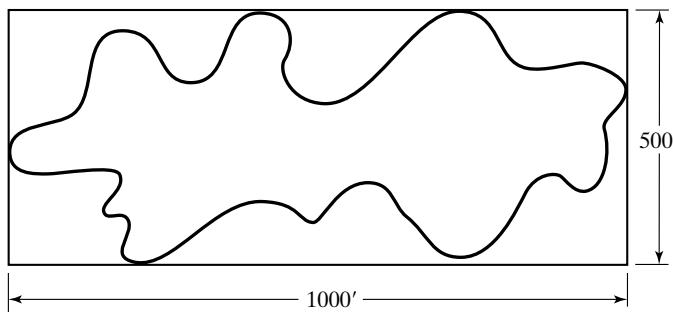 Use simulation to estimate the size of the lake. (One acre 43,560 square feet.)
In Example 6, assume that the average delay with another server, Charlie, is virtually zero. But another server costs $20/hour. If the average caller delay costs $200 per hour, at what point is it advisable to add another server?
In Example 12, why isn’t each path represented about 1/3 of the time?
In Example 11, the only way to have a lead-time demand of 3 or 4 is to have lead time of one day and a demand of 3 or 4. The probability of that happening is 0.36(0.200.35) 0.198. Using this logic, what is the probability of having lead-time demand equal 11 or 12? What is the probability of having it equal 18? (Use computation, not simulation.)
Run the experiment in Example 4 (the Coin Tossing Game) for 4000 trials. Explain why the probability for Harry being ahead on 5 or fewer of the 100 tosses should be larger than the probability that Harry is ahead for 95 or more of the tosses. And why you can say the same thing about Tom—with no contradiction.
Exercises based on the Spreadsheet Examples
Modify Example 2 in Section 1.5 to use the “WRONG !!” formula to generate the service times. Generate a large number of service times, say, 400, and develop a histogram of the resulting frequencies. How close are the sample frequencies to the specified probabilities for each value of service time? Explain why the results differ. That is, explain why the formula is wrong.
In Example 5, let the arrival distribution be uniformly distributed between 1 and 10 minutes (integers only). Run the experiment for 50 trials. Is there any difference between the bin frequencies shown and those of Figure 10?
In Example 5, let the service-time distribution be changed to the following:
| Service Time (Minutes) | 1 | 2 | 3 | 4 | 5 | 6 |
|---|---|---|---|---|---|---|
| Probability | 0.05 | 0.10 | 0.20 | 0.30 | 0.25 | 0.10 |
Run the experiment for 50 trials. Is there any difference between the average waiting time here and that in Example 5 before the change was made? If there is a difference, to what do you attribute it?
Run the experiment in Example 5 for 25, 50, 100, 200, and 400 trials. (All trials are with different sets of random numbers.) What are the differences in the minimum and maximum values of the average waiting times? If there are differences, how do you explain them?
In Example 6, run 10 experiments, each with 100 trials. What was the fraction of trials in each experiment such that the callers had an average delay of three minutes or less? For the 1000 trials just simulated, what fraction of the callers had an average delay of two minutes or less?
In Example 6, conduct an experiment of400 trials. Explain the large spread between the minimum average delay and the maximum average delay.
In Example run 10 experiments with 50 trials each and 10 experiments with 400 trials each. Explain the differences in output that you observe, if any, between the two experiments.
In Example 6, modify the spreadsheet so that the number of calls taken by Able and Baker can be displayed. What fraction did each take in an experiment of 400 trials?
In Example 7, determine the best policy for ordering newspapers based on experiments of 50 trials.
Run 10 experiments, each with 400 trials, in Example 7. What is the largest difference that you got between the maximum and minimum daily profit?
Use the spreadsheet for Example 8. For 100 trials, what is the average ending inventory ifM 11 and N 4, 5, 6?
Use the spreadsheet for Example 8. For 100 trials, what is the average ending inventory if N 5 and M 10, 11, 12?
Starting with the solution to Example 8, modify the solution to model the case where sales are lost; that is, instead of a shortage, those sales are lost. Keep track of the lost sales.
At what bearing cost in Example 9 is the total cost per 10,000 hours virtually the same for the current and proposed systems? Base your estimate on 10 experiments of the current system and of the proposed system, each experiment consisting of 400 trials.
Change the bin width for the histogram on the Experiment sheet for Example 9 (current or proposed) to a width of $50 beginning below the minimum value (for example, if the minimum value is $1528.46, let the first cell begin at $1500). What is the advantage of doing this?
Using the spreadsheet for Example 9 (proposed), run 10 experiments of 40 trials each, and record the range (maximum value minimum value) of the results. Next, compute the average range. Then do the same as before, but use 400 trials in each experiment. If there is a difference, how do you explain it?
Set meters and meters in the spreadsheet for Example 10. Leave the target intact. Conduct a simulation with 200 trials. What was the average number of hits?
Set meters and meters in the spreadsheet for Example 10. Leave the targe intact. Conduct a simulation with 200 trials. What was the average number of hits?
Set meters and meters in the spreadsheet for Example 10. Leave the targe intact. Conduct a simulation with 200 trials. What was the average number of hits? Explain the difference between this exercise and the previous one.
Set meters in the spreadsheet for Example 10. Leave the target intact. What is the value of if the average number of hits is to be about 6.0, based on one experiment of 400 trials
In Example 11, suppose you wanted a better estimate of the distribution of lead-time demand: Would you (1) increase the number of cycles on the ‘One Trial’ worksheet or (2) increase the number of trials on the ‘Experiment’ worksheet? Explain your answer.
In Example 11, suppose you wanted a better estimate of the mean lead-time demand? Wha would you do?
In Example 11, let the demand probabilities be equal for the possible values 3, 4, 5, and 6. Run an experiment with 400 trials. Compare the average lead-time demand from using the original input data and from using the new input data.
In Example 11, let the lead-time probabilities be equal for the possible values 1, 2, and 3. Run an experiment with 400 trials. Compare the average lead-time demand from using the origina input data and from using the new input data.
In Example 12, run the experiment 20 times, each with 400 trials. Record the number of times that the middle path was the longest. What is your best estimate of the probability that the middle path is taken?
In the above exercise, what is the smallest value and the largest value encountered for the number of times that the middle path was selected? What if you had conducted one simulation, gotten the smallest (or largest) value, and reported that as the result? How could you argue yourself ou of that jam?
In Example 12, suppose the third pathway (the bottom one in Figure 20) is changed so that it consists of six U(1,2) activities. Modify the spreadsheet to accommodate this. Which is the mos frequently occurring path now? What insight does this exercise provide?
Using Excel, generate 1000 values in a column, using the formula =-10*LN(RAND()).
(a) Compute descriptive statistics about the data in that column, including the minimum value, the maximum value, the mean, the median, and the standard deviation.
(b) Tabulate the values into 10 bins, each of width equal to 5, the first bin beginning at 0, and the eleventh bin for overflow (if any).
(c) Does the histogram resemble any distribution with which you are familiar? If so, what is its name?
Hint: Use FREQUENCY or COUNT in an Excel formula to count bin frequencies.
- Using Excel, generate 12 columns, each with 250 values, using the formula =RAND().
In cell M1, place the formula =SUM(A1:L1)-6 and copy it to the 249 cells below M1 in column M.
(a) Compute descriptive statistics about the data in column M, including minimum value, maximum value, mean, median, and standard deviation
(b) Tabulate the values with 9 bins. The first bin will include all values less than or equal to 3.5; the next 6 bins are of width one; the last bin will include all values greater than 3.5.
(c) Does the histogram resemble any distribution with which you are familiar? If so, what is its name?
Hint 1: Use FREQUENCY or COUNT in an Excel formula to count bin frequencies.
Hint 2: The values in Column M can be used as a rough approximation to those in Table A.2.
Using Excel, generate a table that can be used instead of Table A.1, using the formula =INT(RAND()*100000).
Use Excel to devise a Monte Carlo experiment to estimate the value of π, as in the equation for the area of a circle,
Hint: Consider a quarter circle with unit radius inside a unit square. Throw a random dart onto the unit square.
- A college student is making financial plans for the next year. Expenses include the following known costs:
Tuition $8,400
Dormitory $5,400
There are also a lot of uncertain expenses, with ranges as follows:
Meals $900–$1,350
Entertainment $600–$1,200
Transportation $200–$600
Books $400–$800
The student foresees income to pay for next year. The only certain amounts are as follows:
State scholarship $3,000
Parental contribution $4,000
Some of the income is variable, with ranges as follows:
Waiting tables $3,000–$5,000
Library aide $2,000–$3,000
The student predicts that a loan will be needed. Develop a spreadsheet model and use it with 1,000 trials to forecast the probability distribution for the size of the loan. Treat any amounts that are variable as uniformly distributed over the range indicated.
- The 22-stop Bally 1090 slot machine had the following number of symbols on each reel:
| Symbols | Reel 1 | Reel 2 | Reel 3 |
|---|---|---|---|
| Cherries | 2 | 5 | 2 |
| Oranges | 2 | 3 | 7 |
| Plums | 5 | 1 | 10 |
| Bells | 10 | 2 | 1 |
| Bars | 2 | 10 | 1 |
| 7's | 1 | 1 | 1 |
Payoffs were as follows:
| Combination | Payoff | Combination | Payoff |
|---|---|---|---|
| Left cherry | 2 | Three plums | 20 |
| Right cherry | 2 | Plum plum bar | 14 |
| Any two cherries | 5 | Bar plum plum | 14 |
| Three cherries | 20 | Three bells | 20 |
| Three oranges | 20 | Bell bell bar | 18 |
| Orange orange bar | 10 | Bar bell bell | 18 |
| Bar orange orange | 10 | Three bars | 50 |
| Three 7's | 100 |
Using Excel, simulate 1,000 plays of this slot machine, each for $1.
How much was the gain or loss?
List of Materials Available on www.bcnn.net
Example2.1CoinToss.xls - Tossing a Coin
Example2.2ServiceTimes.xls - Service Times
Example2.3ArrivalTimes.xls - Arrival Time
Example2.4CoinTossGame.xls - A Coin Tossing Question
Example2.5SingleServer.xls - Grocery Store (single-server queue)
Example2.6AbleBaker.xls - Call Center (two-channel queue)
Example2.7NewsDealer.xls - News Dealer’s Inverntory Problem
Example2.8RefrigInventory.xls - Refrigerator Sales (inventory ordering)
Example2.9CurrentBearings.xls - Current Bearing Replacement Policy
Example2.9ProposedBearings.xls - Proposed Bearing Replacement Policy
Example2.10Target.xls - A Bombing Mission
Example2.11LeadTimeDemand - Lead-Time Demand Distribution
Example2.12Project.xls - Project Activity Network
BCNNvba.xla - Excel add-in (VBA code) to run examples
Chap2Excel5ed.zip - a zip file containing all Excel examples